

Customers
Business Finder: Find Prospects on Google Maps
Pick an industry and an area; businesses land in your pool with their contact details and digital footprint.
Scan Google Maps businesses by industry and location, filter them, see them on the map and move them to accounts with one click.
Features
What can you do with Business Finder?
Industry and area search
Up to 6 industries per search; region, city or a map point, with a 0.5 to 25 km radius.
Detailed filters
Rating range, minimum reviews, businesses without a website and those open right now.
Digital footprint
Phone, web, email, Instagram and Facebook presence at a glance on every row.
List and map together
Each row is linked to its map point; a filter narrows both at once.
One-click move to accounts
Single or bulk transfer, with a duplicate record warning.
WhatsApp intro message
A first message to the prospect from your company's number, with delivery status tracking.
How it works
Step by step
- 1
What are you looking for?
Type your target industries; suggestions come in the language of the country being scanned.
- 2
Where?
Choose a region or mark a point on the map and set the radius.
- 3
Filter
Set the rating, review, website and open-now filters, then start the search.
- 4
Transfer
Move suitable prospects to accounts or send an intro message on WhatsApp.
The most tedious part of finding new customers is building the list: which businesses are in which area, what are their phone numbers, do they have websites? WimCust's Business Finder does this job like a lead generation tool. You type the industry and area you are looking for; businesses listed on Google Maps drop into your prospect pool with address, phone, website, rating and review count.
How do you search?
The search bar is made of three questions: What, Where and scan settings. You can enter up to six industries in one search; each industry is scanned separately and each business carries the keyword it was found with. You give the location by choosing a region or city, typing a place name or marking a point on the map. The location you type and the map are one piece of information: picking a region moves the map there, tapping the map writes the place name by itself. The search radius is adjustable from 0.5 to 25 km.
The scan runs in the language of your company's country. Even if you use the interface in English, a search in a given country is run with that country's own terms, so the results match local business names.
Filters
Not every business is a good fit for you. With scan filters you bring only the profile you are looking for into the pool:
- Rating range and minimum number of reviews
- Businesses without a website
- Those that are open right now
Rows that do not match the filter are not written to the pool. Once the search is done, there is a second filter on the saved list: those that have or do not have a phone, website, email, Instagram or Facebook account, and a minimum rating. These choices do not rerun the search; they only narrow the list and the map together.
List and map side by side
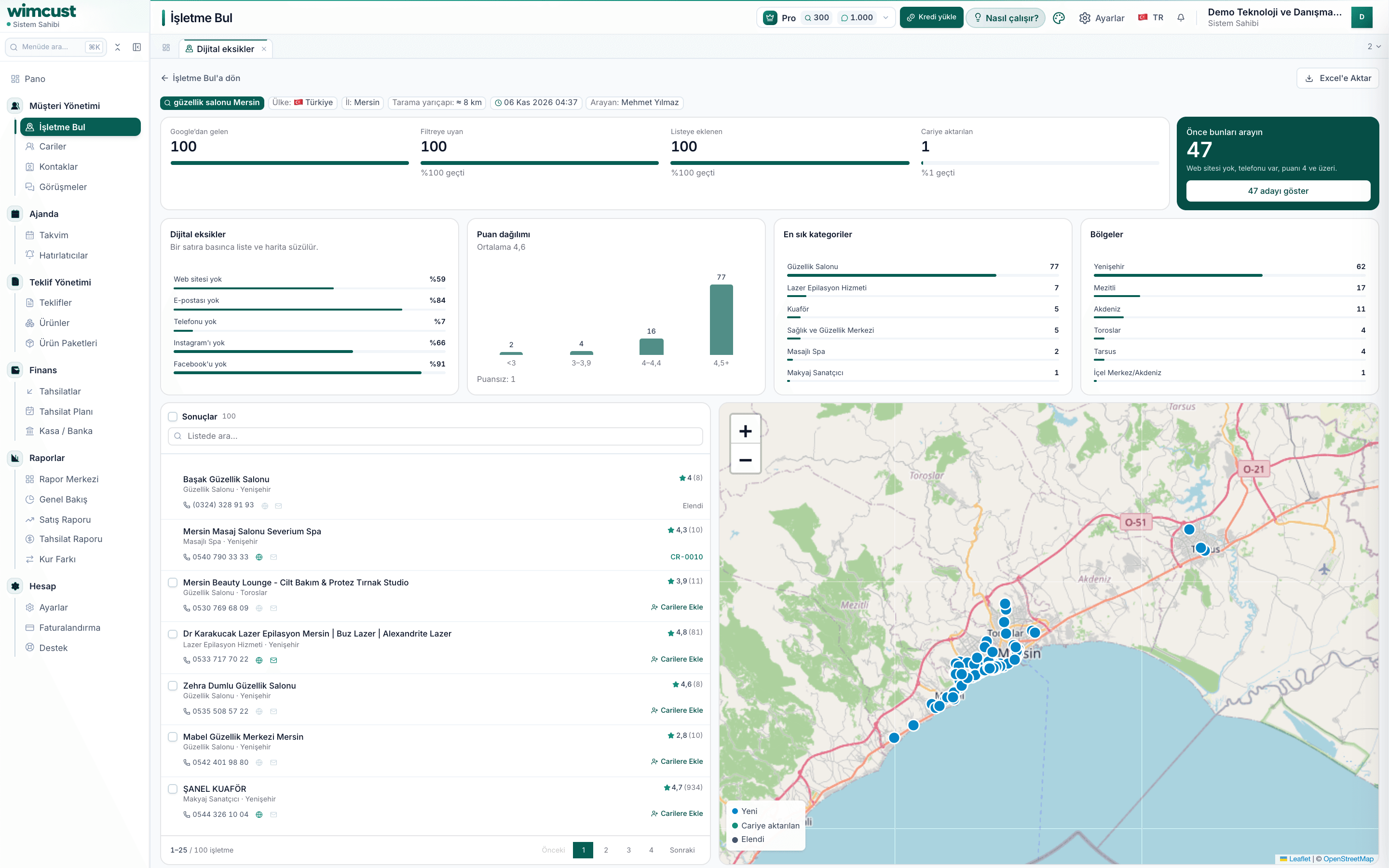
The business list is on the left and the map on the right. When you hover over a row, its point on the map grows; clicking a point takes you to its row. Each row's digital footprint is visible at a glance: phone, web, email, Instagram, Facebook; missing ones are shown struck through. A business without a website is a direct sales opportunity for a web agency, for example.
Searches are grouped under headings; you see how many results each search brought, how many are new and how many were found before. On the search detail page, the ratios, list and map of the results are calculated from the same set. The "priority prospect" rule filters in one click for businesses that are new, have no website, have a phone number and a rating of 4 or above.
From pool to account
The pool is the company's shared space: prospects that nobody owns yet are open to the whole team. When you decide to work with a prospect, you move it to an account; in a single transfer you can complete the form details and add a note, while in a bulk transfer only the type is chosen and the accounts are assigned to the person who transferred them. If an account was previously saved with the same phone number, the system warns you but does not block you. You can dismiss prospects you are not interested in and export the results list to Excel.
Intro message
You can send an introductory message to a prospect in the pool from your company's own WhatsApp number. Writing to the same prospect a second time asks for separate confirmation. In the search header you see separately how many prospects can be written to, how many have been sent, how many failed and how many could not be reached (no phone, landline, no WhatsApp and so on). See the WhatsApp integration page for details.
Long-running searches
A broad scan can take a few minutes. Progress is tracked on screen; if you want to stop the search, you can save what has been found so far or discard everything. Even if you close the page, the search continues, and when you return the results are in your pool.
Credit usage
Business Finder works with scan credits: each business added to your pool for the first time uses one credit; a business already in your own pool is free. Your plan's monthly allowance renews every month, and you can buy extra credits if needed. A search that returns no results uses no credits. Remaining credits are always visible on the search screen.
Business Finder is also in the mobile app: when you are in the field, you can mark your area on the map and scan the businesses around you.
Frequently asked about Business Finder
Where does the business data come from?
First from the WimCust business database: open business data (Overture Maps) and records found in earlier searches. If the requested number is not reached, the missing sectors are completed from businesses publicly listed on Google Maps. A record includes name, address, location, phone, website and, when available, rating, review count, e-mail and social media.
How many credits does a search use?
Each business added to your pool for the first time uses one scan credit. A search that returns no results uses no credits.
What happens if the same business is found a second time?
It stays in the pool as a single record; empty fields that arrive later do not erase existing information. In the search header this business is counted as already in the list.
Can my teammates see the businesses I find?
Yes, the pool is the company's shared space. When a prospect is moved to an account, it enters the portfolio of the person who transferred it and portfolio rules apply from that moment.
Can I search an entire country?
No, every search needs a location and a radius. A search without a location is not accepted because it would not return meaningful results.
Features used together
Calendar and Reminders: Never Forget a Customer Follow-Up
Plan customer follow-ups in the calendar, complete or postpone them. Reminders arrive as panel notifications, email and WhatsApp.
See detailsInteraction Tracking: Every Call, Visit and Meeting on Record
Log calls, meetings, emails and visits on the account; contact history, last contact date and cold-customer alerts build up automatically.
See detailsCustomer Account Tracking: Account Card, Contacts and Portfolio in One Place
Manage customer and supplier accounts, contacts, documents and rep portfolios on one screen with WimCust account tracking.
See detailsSign up and find your first 60 prospects for free
Try Business Finder today
The Starter plan is free forever. Open your account without a credit card and create your first customer card in minutes.