

Industry solution
CRM for Construction Companies
Manage relationships with clients, subcontractors and suppliers, plus quotes, collection plans and progress-payment preparation in one place.
WimCust for construction companies: client and subcontractor account cards, itemized quotes, withholding calculation, installment collection plans and account statements.
Sound familiar?
If you face these problems, you are in the right place
- Withholding calculations on itemized quotes are done by hand.
- Quote revisions get mixed up with each other.
- It is hard to tell which installment payment is overdue.
- Client-side contacts and conversations are scattered.
With WimCust
How we solve it
Client and subcontractor cards
Relationship type, contacts and documents.
Tevkifat and stopaj
Correct deductions on tax and on the base.
Quotes with revisions
Every version is kept, the number stays fixed.
Installment plan
Surcharge rate table and automatic debit entry.
Aging
Overdue receivables in due-date buckets.
In construction and contracting, the sales process is long, quotes are itemized and payments come in installments; tax withholdings are also a natural part of the job. As a construction CRM, WimCust combines the client relationship, the quote and the collection on the same account card. It is not project management, site, quantity takeoff or progress-payment software; it organizes the sales and collection side.
Account types: client, subcontractor, supplier
You record your clients, subcontractors and suppliers as accounts; the relationship type is chosen on the card. On each card the contacts (site manager, purchasing lead, accounting) are kept separately. Tax numbers are validated with check digits, so a wrong number is caught before saving. Files such as contracts and quote PDFs are uploaded to the account as documents.
Itemized quotes and tax withholdings
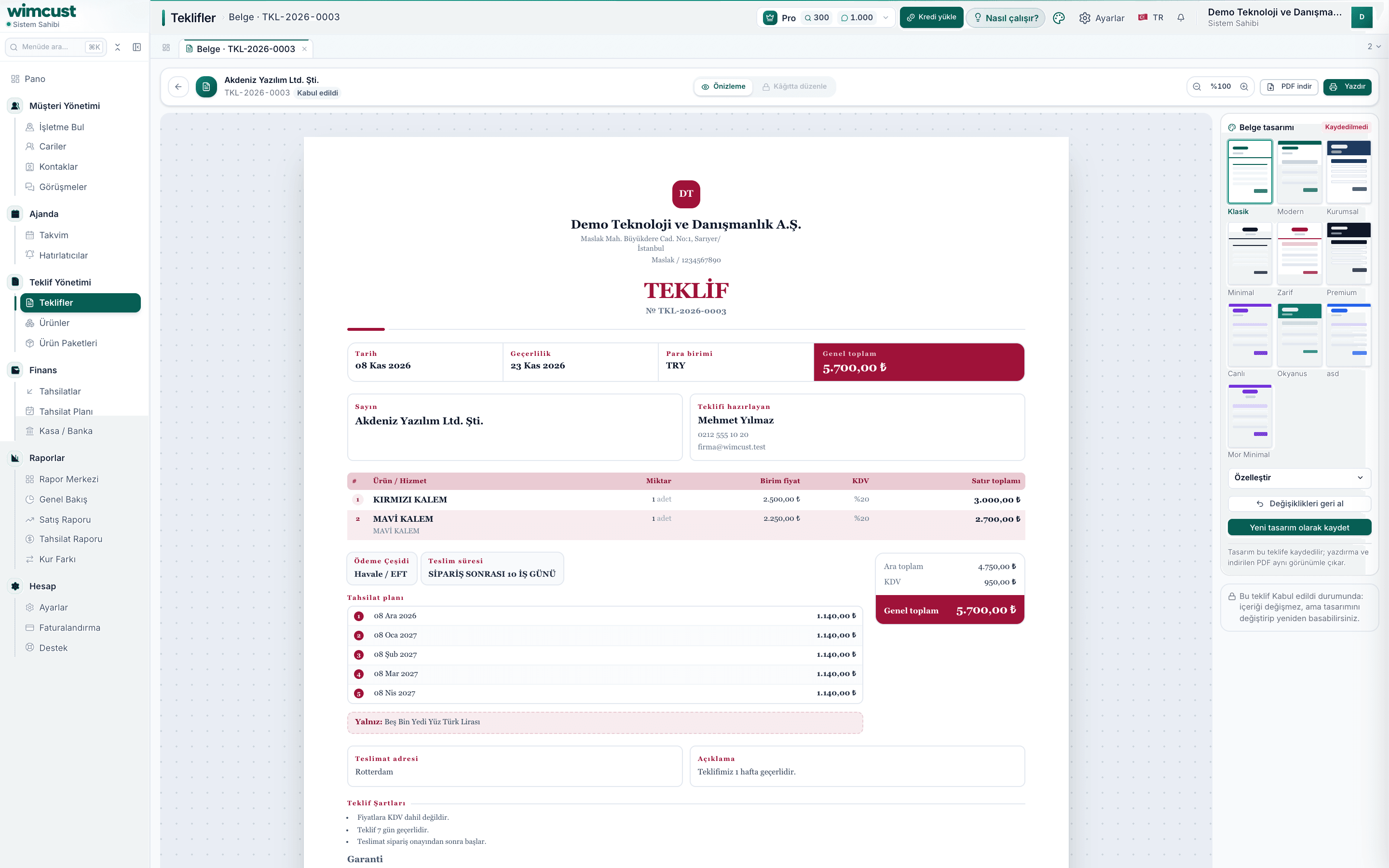
You add material, labor and service items from the catalog or as free lines. Tax, discount and unit are defined per item. For Turkish accounts, tevkifat is calculated on the tax amount and stopaj on the base, and both are deducted from the document; the grand total comes out correct with these withholdings. Because the document discount is distributed proportionally across line bases, tax stays correct on items with different rates. You can enter foreign-currency material prices per line with their currency.
Revisions
When the client changes the scope, you take a revision of the quote. The old version is kept and the quote number does not change; you can always see which version was sent and when. The customer's approval is recorded on the e-Quote link with name, IP and device information; an approval given by phone can be processed from the panel.
Installment collection plan
In the quote you set the payment method and the installments; a rate from your surcharge table applies to deferred installments. An approved quote writes a debit to the account and opens the installments. As payments are entered, the installment statuses update, and the account statement and the cash/bank balance change together. The aging in the Collections report shows overdue receivables by due-date bucket.
Follow-up and reminders
Conversations after a tender or quote, site visits and meetings are logged as conversations. Follow-up dates land in the calendar; installments about to fall due are notified to your team through automation.
Contracts and documents
Signed contracts, technical specifications and quote PDFs are uploaded to the account card as documents; storage space is set by your plan. When you save your quote terms as templates, they come into every new quote in the same order; even if a template changes later, the terms of an already signed quote stay the same. Keeping quotes with tax withholdings and your deferred receivables in one place simplifies month-end reconciliation and lets you answer disputes with the client about amounts based on records.
How to get started
- Import your existing client and subcontractor list with Excel.
- Define your frequently used material and labor items in the catalog.
- Set up your tax, withholding and surcharge rate table.
- Save your quote terms as a template and choose your document design.
- Prepare the first quote and send it with an e-Quote link.
After these steps every new quote is prepared in a few minutes, and with approval the collection plan is created by itself.
WimCust is not a vertical software built for one industry; you use the general CRM features adapted to your work. You define account types, industries, the product catalog, quote terms and roles in your own way. The Starter plan is free with no time limit; you can try it with your own data and decide. Importing your existing client list with Excel, inviting your team and logging the first conversations need no separate setup or technical support; the app is used from the browser and the iOS/Android mobile app. As your needs grow, you can move to the Pro or Premium plan.
Features used in this solution
Quote Management: The Right Quote From Your Catalog in Minutes
Build quotes from your product catalog: foreign-currency lines, discounts, VAT, withholdings and revision tracking in one form.
See detailsPayment Collection Tracking: Instalment Plans, Cash, Bank and Account Statements
From quote approval to collection: instalment plans, late-payment interest, cash and bank accounts, account statements, foreign-currency payments and exchange difference tracking.
See detailsCustomer Account Tracking: Account Card, Contacts and Portfolio in One Place
Manage customer and supplier accounts, contacts, documents and rep portfolios on one screen with WimCust account tracking.
See detailsQuote Design, PDF and Printing
Pick a ready-made document template or save your own quote design; the quote prints and converts to PDF with the same look.
See detailsFrequently asked questions
Does WimCust do progress payments or quantity takeoff?
No. WimCust manages sales, quotes and collection; it is not project and progress-payment software.
Can I prepare a quote with withholding?
Yes, tevkifat is calculated on the tax amount and stopaj on the base, and both are deducted from the total.
Can I send the quote as a PDF?
Yes, a PDF is downloaded with the design you choose; an online e-Quote link can also be sent.
Other solutions
CRM for Medical Device and Healthcare Suppliers
WimCust for medical product and service companies: clinic and hospital account cards, field visit tracking, foreign-currency price quotes, withholding and payment plans.
See detailsCRM for Software Companies and SaaS Sales
WimCust for software companies: target-industry scanning, demo meeting tracking, foreign-currency license quotes, e-Quote approval and installment collection.
See detailsCRM for Digital and Marketing Agencies
WimCust for digital, advertising and software agencies: find businesses without a website, quote with service packages, e-Quote approval and installment collection.
See detailsSign up and find your first 60 prospects for free
Start today and find your first customer this week
The Starter plan is free forever. Open your account without a credit card and create your first customer card in minutes.