

Sales
Quote Design, PDF and Printing
Choose how your quote looks on paper, edit it and download it as a PDF in the same design.
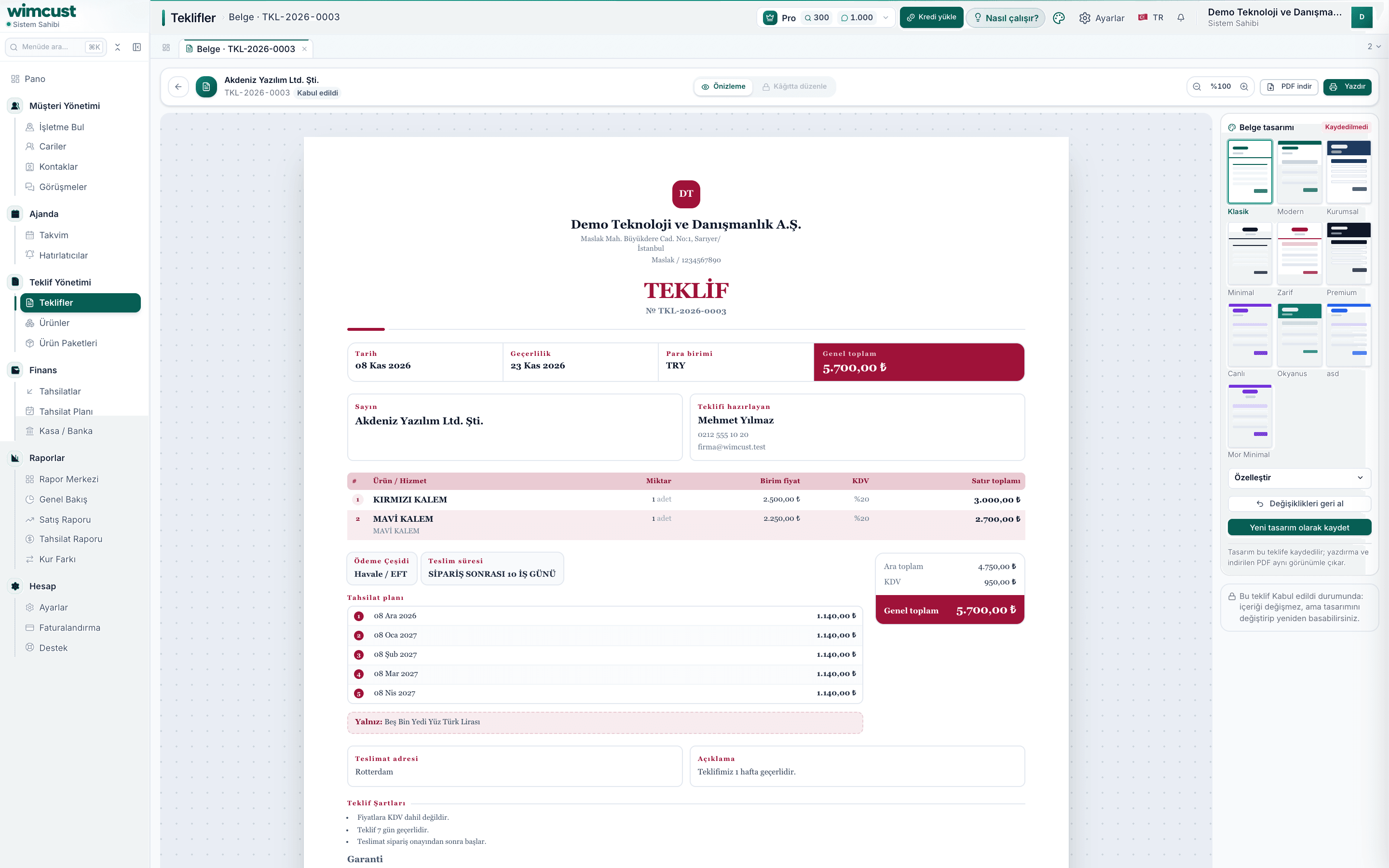
Pick a ready-made document template or save your own quote design; the quote prints and converts to PDF with the same look.
Features
What can you do with Quote Design, PDF and Printing?
Ready-made templates
Ready-made looks led by Classic; change one and save it.
Company default
New quotes open with the default design you chose.
Editing on paper
Edit the quote directly on the document view.
PDF in the same look
The server draws the PDF with the same settings and accented characters.
Multi-language document
PDF labels in the quote's language, 13 languages.
Internal note hidden
The internal note appears in no customer output.
How it works
Step by step
- 1
Choose a template
Start from the ready-made templates or open your saved design.
- 2
Edit it
Change colour and layout settings; changes are saved automatically.
- 3
Print or get a PDF
The document you see in the preview comes out exactly as it is.
The look of a quote matters as much as its content: your logo, your colours, a tidy line-item table and readable terms convey professionalism to the customer. In WimCust, quote design is not a separate job; the look you choose while preparing a quote comes out the same on the print page and in the downloaded quote PDF.
Ready-made templates and your own design
The system has ready-made document templates; the default look is "Classic". You take a template as a starting point, change its settings and save it as your own design. A company can have several saved designs, and one of them is chosen as the default; new quotes open with that look.
Design settings are stored according to a specific schema. If an unrecognized value comes in, it is reset to the default, so a broken setting cannot make the document unreadable.
The document view page
Every quote has a print page. It has two modes:
- Preview - the read-only state of the paper. This is what gets printed and converted to PDF.
- Edit on paper - a mode for editing the quote directly on the document view.
The two modes share the same design settings; a change you make in one is reflected in the other.
The design is saved to the quote
The design you choose for a quote is copied to that quote. Even if you change the company default later, older quotes keep their own look. Changes are saved automatically after a short delay; you do not need to press a "save" button as well.
On approved or expired quotes the content is locked, but the look can be changed. The look is not content: reprinting a signed quote with your new logo does not change the document.
The effective design is determined in this order: the quote's own design, otherwise the company's default design, otherwise Classic.
The server draws the PDF with the same design settings. A font that supports accented characters is used in the PDF so that they print correctly. Capital-letter conversions are also written into the document ready-made, so language-specific casing does not break in the PDF.
PDF texts are prepared in the quote's language. You can give a foreign customer a quote in English, German or Arabic; the fixed headings and labels in the PDF are translated into 13 languages.
What does the customer see and not see?
- The description is visible to the customer and appears in the document.
- The internal note is never visible: not on the print page, not in the PDF, not in the e-quote link.
- Catalog lines reach the customer with the price in the document currency; for a foreign-currency line, the converted unit price is printed, not the raw price.
- If there is a tax withholding, it is shown in the document as a separate deducted line.
Quote terms
Conditions such as payment, delivery and warranty come from terms templates. You prepare the templates with a rich-text editor: bold text, lists, headings. Several templates can be defaults and are added to a new quote in order. The template content is copied into the quote; changing a template later does not affect older signed quotes.
Terms texts pass through a safe filter both when saved and when output. Only permitted formatting tags are printed; harmful content cannot enter the document.
Printing
The print page is prepared to suit the browser's print dialog: menus, buttons and panel elements do not go to paper, only the document is printed. If you prefer, you can also save directly as a PDF from the browser.
Together with online quotes
The online quote link sent to the customer currently opens with the standard layout, while the PDF and print come out with the design you chose. Both show the same amounts and terms, because they all come from the same record.
Tips for a good quote document
- Enter your logo and company details completely once in Settings; they appear automatically in every document.
- Separate your terms templates by topic (payment, delivery, warranty); combine the ones needed in each quote in order.
- Put long product descriptions in the description field rather than the line item name; the table stays readable.
- Prepare the quote in the foreign customer's language; the PDF labels will come out in that language too.
Frequently asked about Quote Design, PDF and Printing
If I change the company default design, do older quotes change?
No. The design is copied to the quote; older quotes keep their own look.
Can I change the design of an approved quote?
Yes. The content is locked but the look does not count as content; the design can be changed and the quote reprinted.
Will accented characters come out broken in the PDF?
No. A font that supports accented characters is used in the PDF and capital letters are written into the document correctly.
Can I issue the quote as an English PDF?
Yes. The fixed texts in the PDF are prepared in the quote's language; 13 languages are supported.
Features used together
Product Catalog: Products, Categories and Bundles
Define products and services with price, unit, VAT and currency; speed up quotes with an unlimited category tree and product bundles.
See detailsOnline Quotes: A Quote Link and the Customer's Signed Approval
Send your quote by WhatsApp or email as a PIN-protected online link; the customer approves or rejects it on a single screen.
See detailsQuote Management: The Right Quote From Your Catalog in Minutes
Build quotes from your product catalog: foreign-currency lines, discounts, VAT, withholdings and revision tracking in one form.
See detailsSign up and find your first 60 prospects for free
Try Quote Design, PDF and Printing today
The Starter plan is free forever. Open your account without a credit card and create your first customer card in minutes.