

Industry solution
CRM for Software Companies and SaaS Sales
Prepare license and service quotes in foreign currency, track demo meetings, and follow renewals and installments.
WimCust for software companies: target-industry scanning, demo meeting tracking, foreign-currency license quotes, e-Quote approval and installment collection.
Sound familiar?
If you face these problems, you are in the right place
- Follow-up after a demo slips and the opportunity goes cold.
- Exchange rate calculation gets confusing in foreign-currency license quotes.
- Setup and subscription installments sit in separate sheets.
- It is unknown which industry's customers were won.
With WimCust
How we solve it
Industry scanning
Find the target industry by region and country.
Demo tracking
Meetings and reminders in the calendar.
Foreign-currency license quote
Per-line currency and rate.
Revisions
Version history when the scope changes.
Sales report
Quotes issued and won are shown separately.
In software sales the process usually starts with picking a target industry, continues with a demo, goes on with quote and negotiation, and ends with license or subscription collection. As a software company CRM, WimCust follows these steps in one app.
Scan your target industry
If your product serves a specific industry (for example clinics, restaurants, auto repair shops), you scan that industry in the area you want with Find Businesses. Results are filtered by rating, review count and digital presence; suitable prospects are imported as accounts. You can also scan markets outside Turkey; the search is sent in that country's language.
Demo and conversation tracking
Demo meetings, phone calls, emails and notes are logged on the account card as conversations. You add a follow-up reminder to the meeting; it shows in the calendar and is notified on time. A future-dated meeting does not count as last contact because it has not happened yet; contact data in reports reflects real interaction. Decision makers, technical leads and the purchasing unit are kept separate as contacts.
License and service quotes
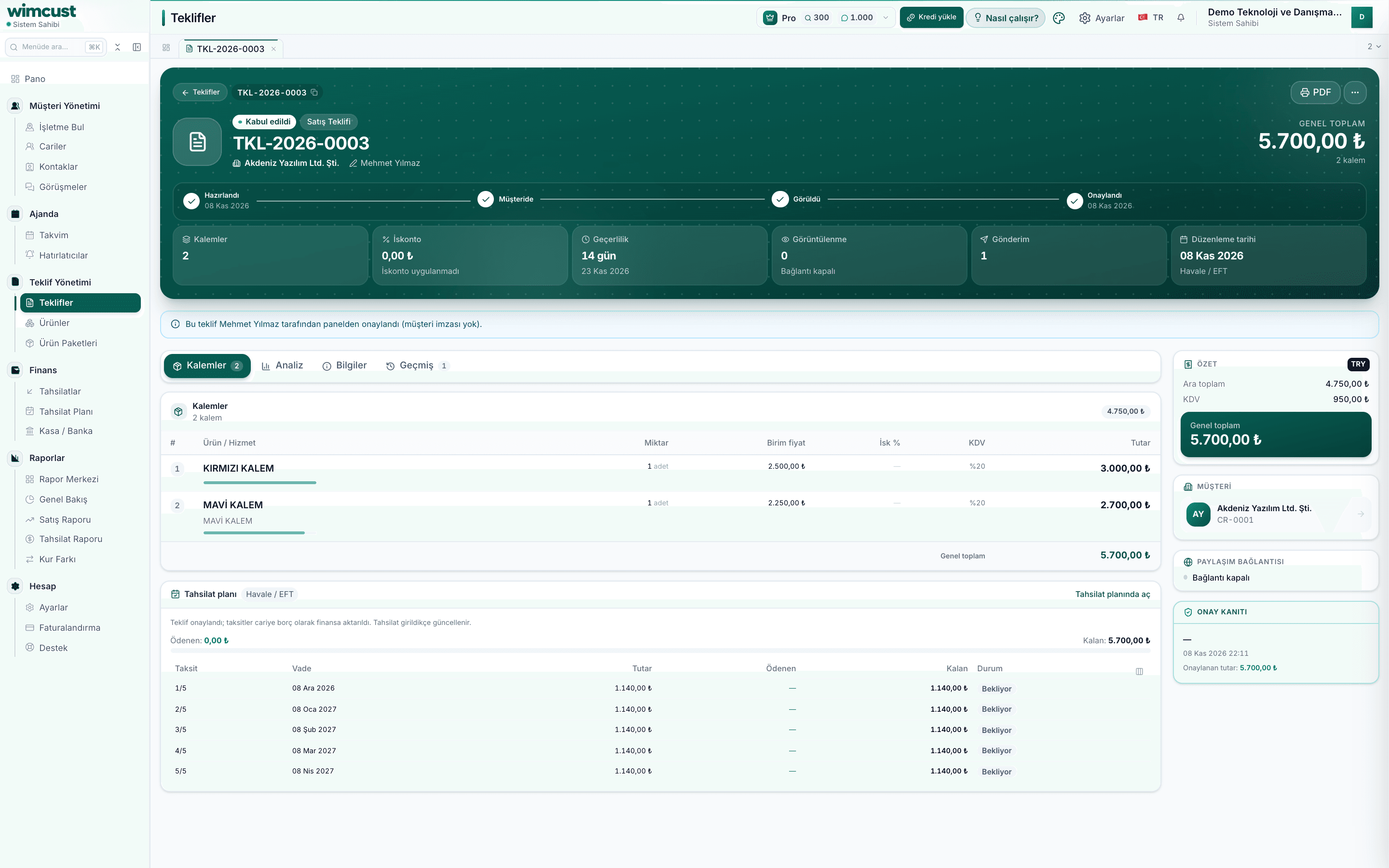
You define license, setup, training and support items in the catalog. A quote can be in foreign currency; each line carries its own currency, and the rate comes from TCMB or the ECB. Line and document discounts, tax and, where applicable, withholding are calculated. As the client changes scope, revisions are taken and old versions are kept.
Online approval and collection
The quote is sent with an e-Quote link and the customer approves online; the IP and device trail is stored. The setup fee and monthly or yearly installments are opened in the collection plan. When a foreign-currency debt is collected in local currency, the FX difference is recorded. The Sales report looks at quotes issued and won in the period separately; revenue won is visible broken down by account and product.
Sales team
You distribute portfolios to your sales reps and set permissions with roles. A rep sees their own opportunities, a manager sees the whole team.
Multiple stakeholders at an enterprise customer
In enterprise software sales the decision sits with several people. You keep each stakeholder separate with the contact list on the account card and send the quote to several people in a single send by WhatsApp or email. Since at most three sends to the same person on the same channel are allowed, you do not accidentally flood anyone with messages. Who approved on the customer side and from which device is on record.
How to get started
- Define your product and service items with their currencies in the catalog.
- Scan your target industry with Find Businesses.
- Log demo meetings on the account card and add follow-up reminders.
- Prepare the license quote in foreign currency and send it with an e-Quote link.
- Follow setup and subscription installments in the collection plan.
The Sales report shows period by period how many of the quotes you gave were won.
WimCust is not a vertical software built for one industry; you use the general CRM features adapted to your work. You define account types, industries, the product catalog, quote terms and roles in your own way. The Starter plan is free with no time limit; you can try it with your own data and decide. Importing your existing client list with Excel, inviting your team and logging the first conversations need no separate setup or technical support; the app is used from the browser and the iOS/Android mobile app. As your needs grow, you can move to the Pro or Premium plan.
Features used in this solution
Business Finder: Find Prospects on Google Maps
Scan Google Maps businesses by industry and location, filter them, see them on the map and move them to accounts with one click.
See detailsInteraction Tracking: Every Call, Visit and Meeting on Record
Log calls, meetings, emails and visits on the account; contact history, last contact date and cold-customer alerts build up automatically.
See detailsQuote Management: The Right Quote From Your Catalog in Minutes
Build quotes from your product catalog: foreign-currency lines, discounts, VAT, withholdings and revision tracking in one form.
See detailsMulti-Language and Multi-Currency: 13 Languages, Automatic Rates, Per-Line Currency
WimCust works in 13 languages; your main currency follows your country, rates come automatically from the TCMB or ECB, and quote lines can be in foreign currency.
See detailsReports and Report Center: Measure Sales, Collections and Your Team
Sales funnel, conversion, rep scorecard, collection ageing and exchange difference reports; detailed breakdowns and Excel from the Report Center.
See detailsFrequently asked questions
Are subscription renewals invoiced automatically?
No, there is no invoicing module; you track the installments in the collection plan and can send reminders.
Can I scan in a market abroad?
Yes, the scan depends on the country and the industry term is sent in that country's language.
Can a quote be prepared in English?
A quote is prepared in one language and PDF translations are available in the supported languages; automation messages go out in the quote's language.
Other solutions
CRM for Medical Device and Healthcare Suppliers
WimCust for medical product and service companies: clinic and hospital account cards, field visit tracking, foreign-currency price quotes, withholding and payment plans.
See detailsCRM for Digital and Marketing Agencies
WimCust for digital, advertising and software agencies: find businesses without a website, quote with service packages, e-Quote approval and installment collection.
See detailsCRM for Wholesalers and Distributors
WimCust for wholesalers and distributors: lead generation by region, product catalog and bundles, multi-currency quotes, field visits and payment collection tracking.
See detailsSign up and find your first 60 prospects for free
Start today and find your first customer this week
The Starter plan is free forever. Open your account without a credit card and create your first customer card in minutes.