

Platform
Reports and Report Center: Measure Sales, Collections and Your Team
One-screen analysis dashboards and detailed breakdowns; filter them, share them, export to Excel.
Sales funnel, conversion, rep scorecard, collection ageing and exchange difference reports; detailed breakdowns and Excel from the Report Center.
Features
What can you do with Reports and Report Center?
Overview
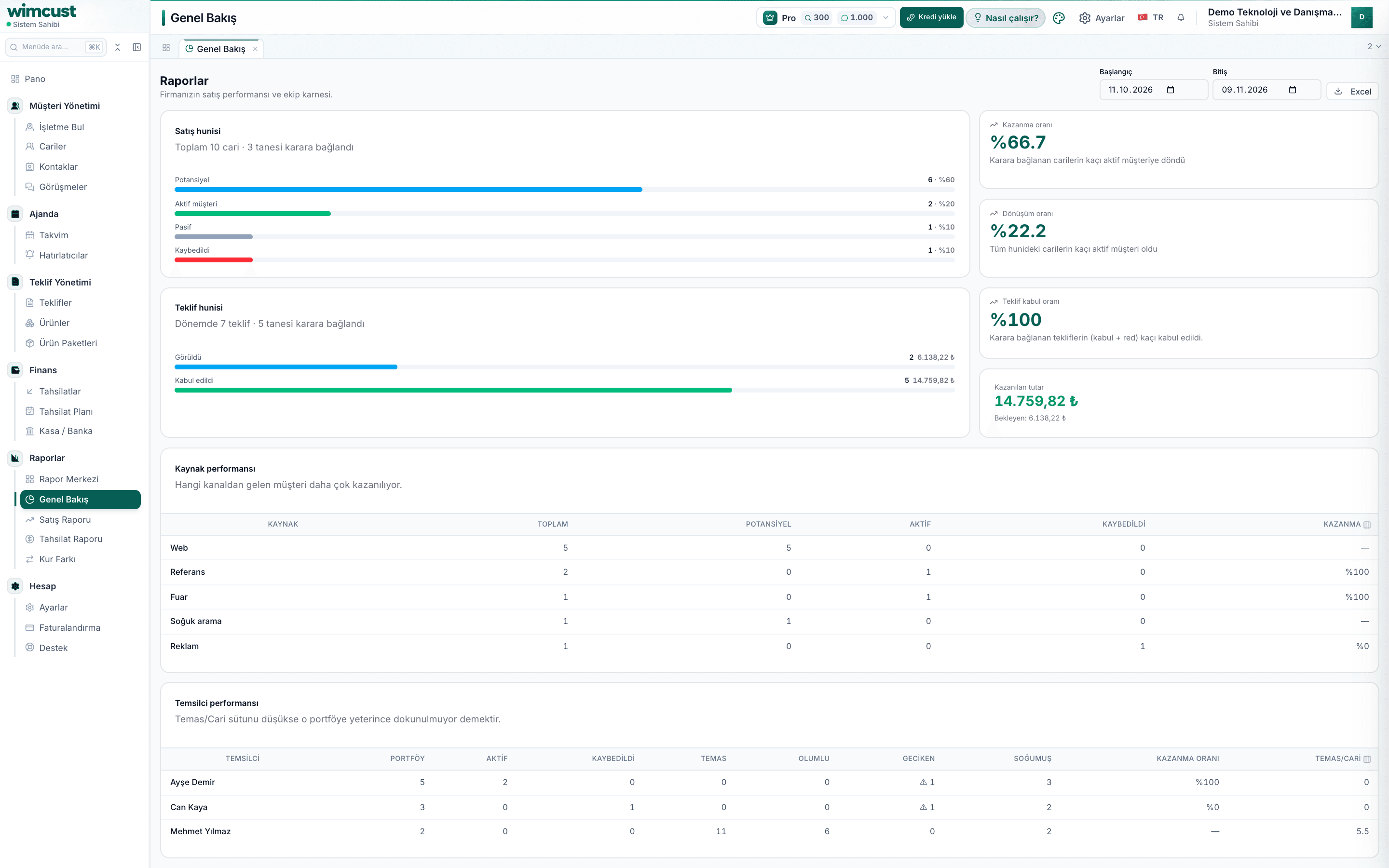
Funnel, source performance, interaction breakdown and rep scorecard.
Sales report
Quotes issued and won kept apart; 12-month series.
Collection report
Ageing, monthly collections and the accounts that owe the most.
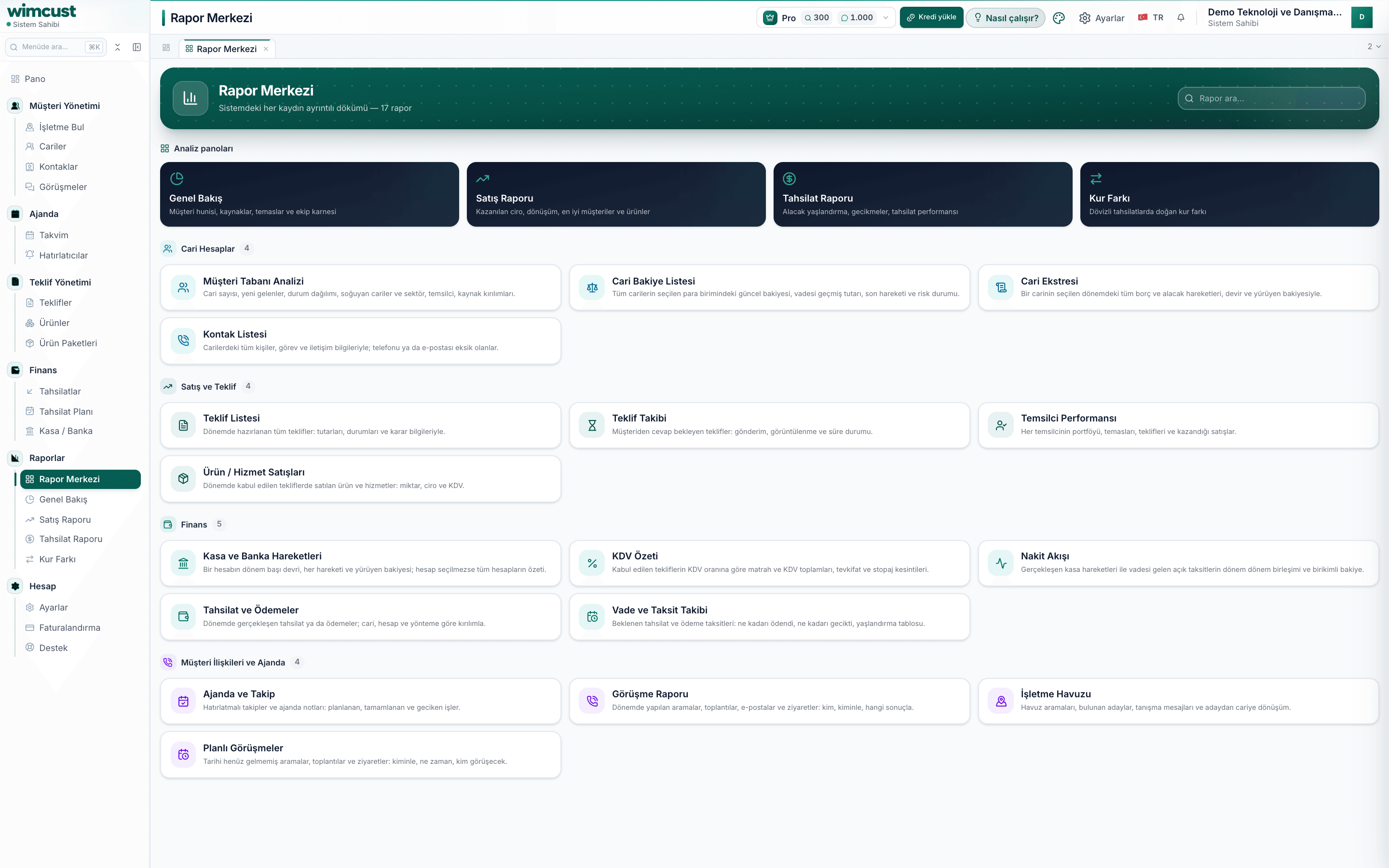
Report Center
Detailed breakdowns; filters in the address, shareable.
Export to Excel
A summary and each table on its own sheet; numbers as numbers.
Currency separation
Different currencies are not added up; you read by choosing a currency.
How it works
Step by step
- 1
Choose the report
From the Reports section or the Report Center catalog.
- 2
Filter
Choose the period, currency, rep and other filters.
- 3
Share or download
Send the address or export to Excel.
Every record entered in a CRM is also a data point. WimCust's reports present this data in two ways: one-screen analysis dashboards for quick decisions, and the Report Center for drilling into detail. Both are fed from the same records and follow the same permission rules.
The Reports section
Overview
A summary of the customer relationship:
- Sales funnel - the distribution of accounts by status, win and conversion rate
- Source performance - where customers come from and which source converts better
- Interaction breakdown - the distribution of conversations by type and how it moves over time
- Rep scorecard - portfolio and contacts per rep (only for authorized users)
Sales
The sales report keeps two separate questions apart:
- Quotes issued in the period: volume, conversion, status distribution.
- Quotes won in the period: revenue, the accounts and products that bring in the most. The won amount is the amount at the time of approval.
Monthly series show the last 12 months regardless of the period you choose. A rep sees their own portfolio; the rep breakdown is open only to authorized users.
Collections
Calculated as of today:
- Ageing - the remaining open instalments: not yet due, 1-30, 31-60, 61-90 and 90+ days
- Monthly collections - the amount collected each month, in the currency of the debt
- Accounts that owe the most - by statement balance
Exchange Difference
Exchange differences that arise when foreign-currency debts are collected at a different rate, and the total for the last 12 months. See the collection tracking page for details.
Currencies are not added together
A report that adds dollars and euros together produces a wrong figure. In WimCust every monetary measure carries its own currency; you choose the currency from the report's top bar and the figures are the records in that currency. The default currency is your company's main currency. If a table has more than one currency, the total row shows "—".
Report Center
The Report Center is the catalog of detailed breakdowns. Each report is made of cards, charts, tables and alerts, all drawn in the same layout. Reports are divided into account, CRM, sales and finance groups.
- Filters live in the address bar. When you send the address of a filtered report to a teammate, they open the same view; the browser's back button works too.
- Export to Excel - a summary sheet and each table as a separate sheet; numbers are written as numbers, not text, so you can calculate in Excel. Excel export depends on your plan's Excel module.
- Scope - a rep sees their own portfolio. Reports such as finance and account statements require the finance report permission; a user without it does not see them in the catalog.
- Module - reports that belong to a module turned off for your company are hidden in the catalog.
Report texts are prepared in 13 languages; when you change your interface language, reports open in that language too.
Dashboard
You see the picture of the day without going to reports. The dashboard lists overdue follow-ups, cold accounts and recent contacts; the same information is on the summary screen of the mobile app. The Overview, Sales and Collection reports also open on mobile.
What should you use reports for?
- The funnel and issued-versus-won quote comparison in the weekly sales meeting
- Using collection ageing at month end to decide which customer to call
- Balancing portfolio distribution and workload with the rep scorecard
- Directing the marketing budget to the right channel with source performance
Right data, right report
The quality of reports depends on the quality of the records entered. Filling in the source of accounts (trade show, referral, Business Finder, website) makes source performance meaningful. Logging interactions with the right type makes the contact breakdown realistic. Having quotes approved from the panel or the online quote link ensures that the won amount and date are correct. In short, reports do not add a separate workload; they fill up by themselves as you do your daily work in WimCust.
Frequently asked about Reports and Report Center
Do reps see the reports of the whole company?
No. In reports, a rep sees their own portfolio; the rep breakdown and finance reports depend on permissions.
Are sales in different currencies added up?
No. Each measure is kept in its own currency, and you choose the currency from the report's top bar.
Can I export reports to Excel?
Yes, Report Center reports are exported to Excel with a summary sheet and a separate sheet per table. Excel export depends on your plan's Excel module.
Are reports on mobile too?
Yes, the mobile app has the Overview, Sales and Collection reports.
Features used together
Multi-Language and Multi-Currency: 13 Languages, Automatic Rates, Per-Line Currency
WimCust works in 13 languages; your main currency follows your country, rates come automatically from the TCMB or ECB, and quote lines can be in foreign currency.
See detailsAutomation: The Right Message to the Right Person When an Event Happens
With admin and customer automation, send email and WhatsApp notifications on quote and payment events using ready-made system texts.
See detailsWhatsApp Integration: Customer Communication From Your Company's Number
Connect your company's WhatsApp number with a QR code; send quote links, intro messages, automation and reminders from your CRM.
See detailsSign up and find your first 60 prospects for free
Try Reports and Report Center today
The Starter plan is free forever. Open your account without a credit card and create your first customer card in minutes.