

Sales
Online Quotes: A Quote Link and the Customer's Signed Approval
Send the quote as a link; the customer opens it with a PIN, reviews it and approves by typing their name.
Send your quote by WhatsApp or email as a PIN-protected online link; the customer approves or rejects it on a single screen.
Features
What can you do with Online Quotes?
A quote in one link
The customer opens it from a phone or computer without downloading an app.
PIN protection
A 4, 6 or 8-digit PIN; 15-minute lock after five wrong attempts.
Named approval trail
Name, IP and device details are recorded with the approval.
WhatsApp and email
From the company's number and email, to several recipients.
Opened notification
The team is notified when the customer first opens the quote.
Automatic closing
The link closes when a decision is made or the validity period ends.
How it works
Step by step
- 1
Open the send window
Press the e-Quote button in the quote detail.
- 2
Choose recipients and channel
The account or its contacts; WhatsApp, email or both.
- 3
Send the ready text
The system text comes ready with the link and PIN; you just send it.
- 4
Follow the decision
Opened and approval notifications arrive, and approval flows into finance.
Attaching a PDF to an email and saying "if you approve, sign it, scan it and send it back" creates work for the customer. WimCust's online quote feature turns your quote into an online quote link. The customer opens the link on their phone or computer, sees the line items, amounts and terms, and if they like it, approves by typing their name. At the moment of approval the quote is accepted and the trail is recorded.
How is the link created?
When you press the "e-Quote" button in the quote detail or in the list, the send window opens. The window prepares the link, the access PIN if there is one, and a message text ready to send. The text is provided by the system and cannot be edited; you choose the recipients and channel and send it. Generating the link alone does not make the quote "sent"; the quote moves to the sent status at the moment you send it.
Once the link is generated, it stays the same. When you share the quote a second time, the old link in the customer's hands is not broken.
Sending: WhatsApp and email
- The WhatsApp message goes from your company's connected number, not from your personal phone. The country code is taken from the account's country, or from your company's if there is none.
- The email goes out under your company's name; from your own email server if you have set one up.
- You can choose the account itself and its active contacts as recipients; several people can be selected on each channel.
- A maximum of three sends are made to the same person on the same channel. This limit prevents bothering the customer and accidental repeats.
PIN protection
A quote contains commercial information; even if the link is forwarded to the wrong person, its content should not open. That is why online quote links are protected by default with an access PIN:
- The PIN can be 4, 6 or 8 digits; your company chooses the setting.
- You can turn on adding the PIN to the message text as an "Access PIN" line, or you can pass the PIN to the customer through a separate channel.
- After five wrong attempts in a row, the link is locked for 15 minutes.
- Once the correct PIN is entered, the customer can open the quote for 12 hours without being asked for the PIN again.
- Your team sees the PIN in the share card in the quote detail; the "Preview" button opens the quote as the customer will see it, without asking for the PIN.
The link itself also carries an unguessable key, and only a digest of this key is looked up in the system.
The customer's approval
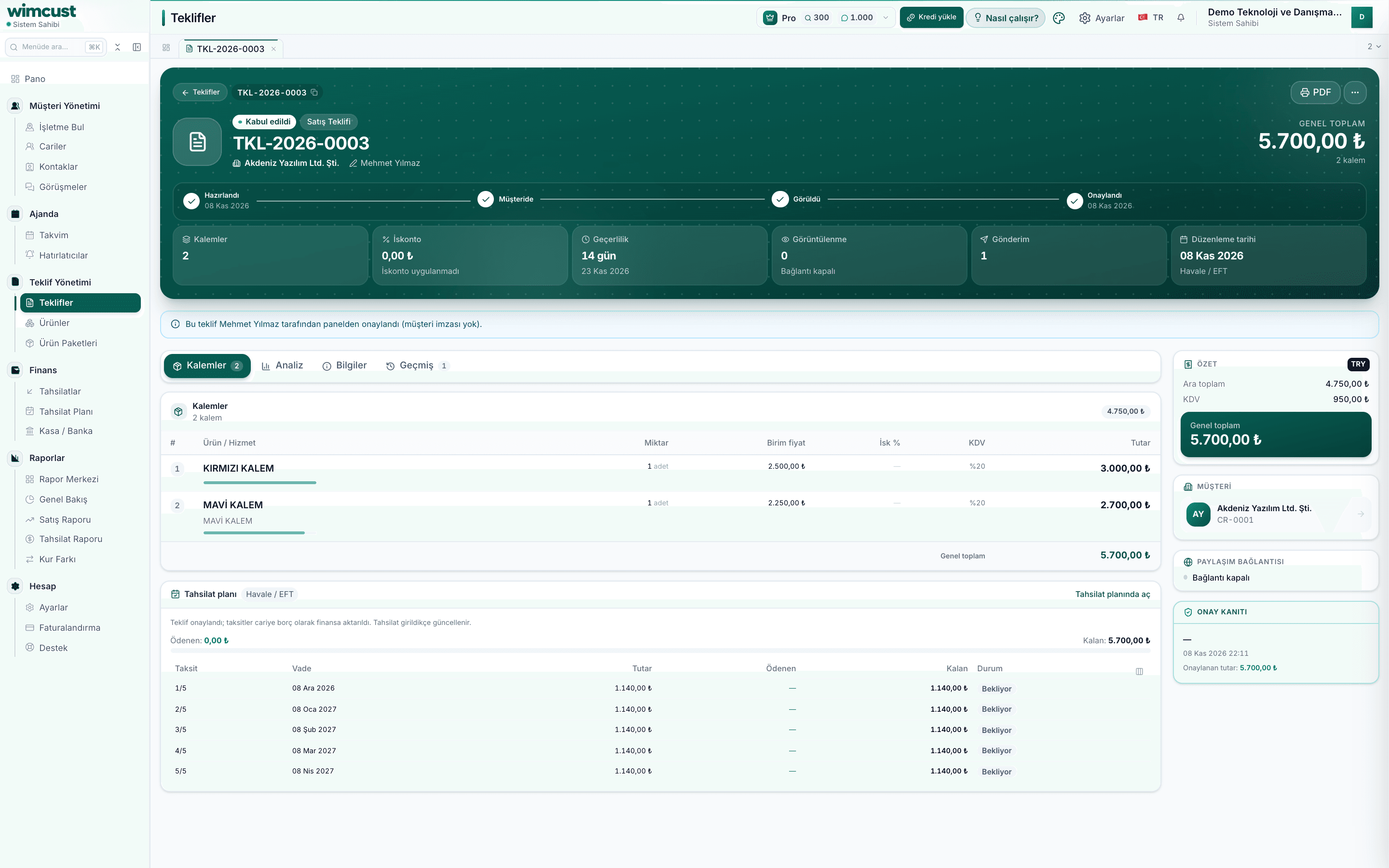
When the customer opens the quote, they see the line items, totals, payment plan and quote terms. Your internal notes never appear on this screen under any circumstances. To approve or reject, they type their name; together with the approval, their IP address and device information are also recorded. This information is visible in the approval record window in the quote list.
The link closes the moment a decision is made. Even if the same quote was opened in two tabs, a second approval is not accepted; a quote is approved once.
Opened and decision notifications
The first time the customer opens the quote and the decision they make are automation events. If you turn on email or WhatsApp notifications for these events, your sales team is informed when the customer opens the quote. The follow-up call is made at exactly the right time: while the customer is reading the quote.
Validity period
A quote has a validity date. When the date passes, the link is closed to the customer and the quote is marked "expired" in the nightly check. Even if you moved the validity date earlier, it is checked again the moment the link is opened.
After approval
The customer's approval has the same result as a panel approval: the quote is accepted, the amount is written to the account's statement as a debit and its payment plan is transferred to finance. If a revision is needed, the previous approval trail moves to the revision and is not deleted. See the quote management and collection tracking pages for details.
Sending from mobile
In the mobile app, the same send window opens from the quote detail: WhatsApp, email, PIN and share options are ready on the phone too.
Why a link instead of a PDF?
You cannot tell whether a PDF attached to an email was opened; to approve, the customer has to print, sign and send it back. A link, on the other hand, opens with a single tap on the customer's phone, tells you the moment it is opened and takes the decision on the same screen. An approved quote moves to finance without delay. If you would still like the customer to hold a document, you can download the PDF and send it separately.
Frequently asked about Online Quotes
Does the customer need to download an app or sign up?
No. The customer opens the link in a browser; if PIN protection is on, they enter the PIN and see the quote.
Can I turn off the PIN?
Yes, PIN protection is a company setting and can be turned off. It is on by default.
Can I make changes after the customer approves the quote?
An approved quote cannot be edited. If an authorized user undoes the approval, the quote returns to draft and the approval trail is kept as a revision.
How many times can I send the quote to the same person?
At most three times to the same person on the same channel. If one of the selected recipients has reached the limit, nothing is sent and a warning is shown.
Will I know when the customer opens the quote?
Yes, you can turn on an email or WhatsApp notification for the quote's first-opened event in admin automation.
Features used together
Product Catalog: Products, Categories and Bundles
Define products and services with price, unit, VAT and currency; speed up quotes with an unlimited category tree and product bundles.
See detailsQuote Design, PDF and Printing
Pick a ready-made document template or save your own quote design; the quote prints and converts to PDF with the same look.
See detailsQuote Management: The Right Quote From Your Catalog in Minutes
Build quotes from your product catalog: foreign-currency lines, discounts, VAT, withholdings and revision tracking in one form.
See detailsSign up and find your first 60 prospects for free
Try Online Quotes today
The Starter plan is free forever. Open your account without a credit card and create your first customer card in minutes.