

Solution
Sales Team Management Software
Assign portfolios to reps, grant permissions with roles, and follow the team's calendar and performance from one screen.
Sales team management with WimCust: rep portfolios, roles and permissions, portfolio transfer, team calendar and rep scorecard reports.
Sound familiar?
If you face these problems, you are in the right place
- Reps call each other's customers and conflicts arise.
- When a rep leaves, their customers and notes disappear.
- Everyone sees everything; financial data is open to people who do not need it.
- What each person is doing is only learned when asked in a meeting.
With WimCust
How we solve it
Rep portfolios
Each rep sees only their own accounts.
Portfolio transfer
Hand accounts over to another rep with bulk assignment.
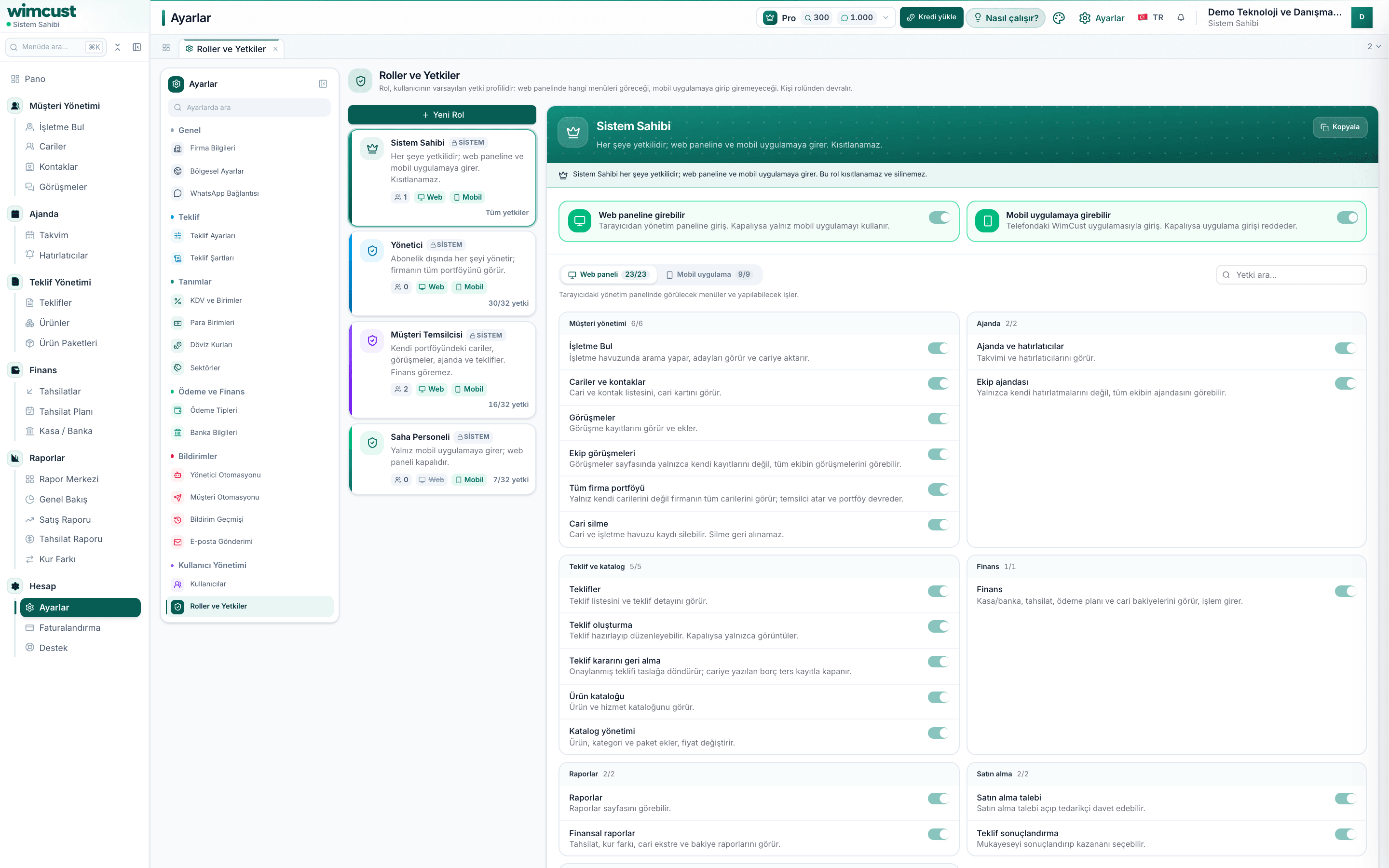
Roles and permissions
Ready-made system roles and custom roles, with web and mobile set separately.
Team calendar
See the whole team's scheduled work in one calendar.
Rep scorecard
Activity and sales reports by rep.
As a team grows, the questions of sales management change: which customer belongs to whom, who called whom this week, whose quotes are getting approved? For sales team management, WimCust offers portfolio, role and report layers in a single app.
Portfolio: who sees what
Each account is assigned to a sales rep. A user with the sales rep role sees only their own portfolio, their own conversations and their own quotes. An authorized user sees the whole company; with bulk assignment they can hand one rep's accounts over to another. A rep who has a portfolio cannot be deleted; the portfolio is transferred first or the user is set to inactive, so customer history never ends up ownerless.
Roles and permissions
Every company starts with four ready-made roles: system owner, manager, sales rep and field (mobile only). You can also create your own roles. The role determines which menus the user sees and what they can do: seeing all accounts, finance, reversing quote approvals, catalog management, user management and so on. The sign-in channel is also a property of the role; you can turn off a role's web or mobile access. If needed, a single person can be given a different permission list from their role.
There is protection against privilege escalation: someone with the user management permission cannot give another person a permission they do not have themselves, and cannot change their own role.
Team calendar
Follow-up reminders added to conversation records are collected in the calendar. A rep sees their own calendar; an authorized user can switch to team scope and follow the whole team's scheduled work. Reminders are delivered on time through panel notifications and the channels you select.
Performance reports
The Overview report shows the funnel, source performance, activity breakdown and the rep scorecard; the breakdown by rep is open only to authorized users. The Sales report looks at quotes issued and won in the period separately. The Report Center exports detailed breakdowns to Excel.
The team in the field
In the mobile app a rep sees their accounts on the map, enters the contact record and follow-up reminder from their phone after a visit and sends a quote by WhatsApp. Screens depend on the role's mobile permissions.
Adding users to the team
From the Users screen you invite a teammate by email and choose their role in the invitation. In the user list everyone's role shows as a badge; in a separate window you can narrow or widen a person's permissions individually. If the individual list is cleared, the user inherits their role's permissions again.
Separation of duties in quote approval
A rep can prepare and send quotes; processing an approval the customer gave by phone is also possible from the panel, and who made that decision is recorded. Reversing the decision on an approved quote is a separate permission; you can open it only to the people you choose.
The menu simplifies itself
A user's menu and settings pages are trimmed according to their permissions. A rep without the finance permission never sees the finance menu; when their permissions change, their menu updates on the next page load, no sign-out needed. The real check is always on the server.
Dashboard
The dashboard shows overdue follow-ups, cooling accounts and recent contacts together. For an authorized user it is the fastest way to see which customers the team is neglecting without waiting for a meeting; for a rep, it is the day's priority list.
Details: team and permissions, reports, mobile app.
Features used in this solution
Team and Permission Management: Roles, Permissions and Rep Portfolios
Set your team's permissions for web and mobile separately with ready-made system roles or your own roles; reps see only their own portfolio.
See detailsCalendar and Reminders: Never Forget a Customer Follow-Up
Plan customer follow-ups in the calendar, complete or postpone them. Reminders arrive as panel notifications, email and WhatsApp.
See detailsReports and Report Center: Measure Sales, Collections and Your Team
Sales funnel, conversion, rep scorecard, collection ageing and exchange difference reports; detailed breakdowns and Excel from the Report Center.
See detailsWimCust Mobile: Your CRM in the Field, in Your Pocket
With the WimCust mobile app, see your customers on the map, log contacts, manage your calendar, send quotes and find businesses in the field.
See detailsCustomer Account Tracking: Account Card, Contacts and Portfolio in One Place
Manage customer and supplier accounts, contacts, documents and rep portfolios on one screen with WimCust account tracking.
See detailsFrequently asked questions
How many users can I add?
The user limit depends on your plan; it can be unlimited in the plan definition.
Can I stop a rep from seeing finance?
Yes, the finance permission is switched on or off in the role; it is off in the default sales rep role.
Does an inactive user count toward the license?
A rep set to inactive does not count toward the user limit and cannot sign in.
Other solutions
Switching from Excel to a CRM
Move your Excel customer list into WimCust with a preview import; go beyond Excel's limits with conversation history, reminders, quotes and team permissions.
See detailsCRM Software for Small and Mid-Sized Sales Teams
WimCust CRM software: lead generation, account tracking, conversations and calendar, quotes and e-Quote, payment collection, WhatsApp, automation, reports and a mobile app on one platform.
See detailsWhatsApp CRM for Customer Follow-Up
Send quote links, introduction messages and automatic reminders from your company's own WhatsApp number in WimCust; every message stays logged in notification history.
See detailsSign up and find your first 60 prospects for free
Start today and find your first customer this week
The Starter plan is free forever. Open your account without a credit card and create your first customer card in minutes.