

Solution
WhatsApp CRM for Customer Follow-Up
Connect your company's WhatsApp number; send quotes, reminders and introduction messages from the CRM.
Send quote links, introduction messages and automatic reminders from your company's own WhatsApp number in WimCust; every message stays logged in notification history.
Sound familiar?
If you face these problems, you are in the right place
- Customer conversations stay on the rep's personal phone.
- Quote links are copied and sent by hand, and nobody knows who received them.
- Payment and follow-up reminders get forgotten.
- Customers do not trust messages sent from a shared number.
With WimCust
How we solve it
Your company's number
Connect with a QR code so messages go out from your own number.
Quote sending
Link, PIN and a ready system message; multiple recipients.
Automatic messages
Event-based team and customer notifications.
Notification history
Every outgoing message is logged with recipient and status.
Credit control
Credits are refunded on failed sends.
In many markets, most customer conversations happen on WhatsApp. The problem is that these conversations stay on the phone; which quote was sent to whom and which reminder was made never shows up in the CRM. WimCust handles WhatsApp customer follow-up through your company's own number and records every outgoing message.
Connect your own number
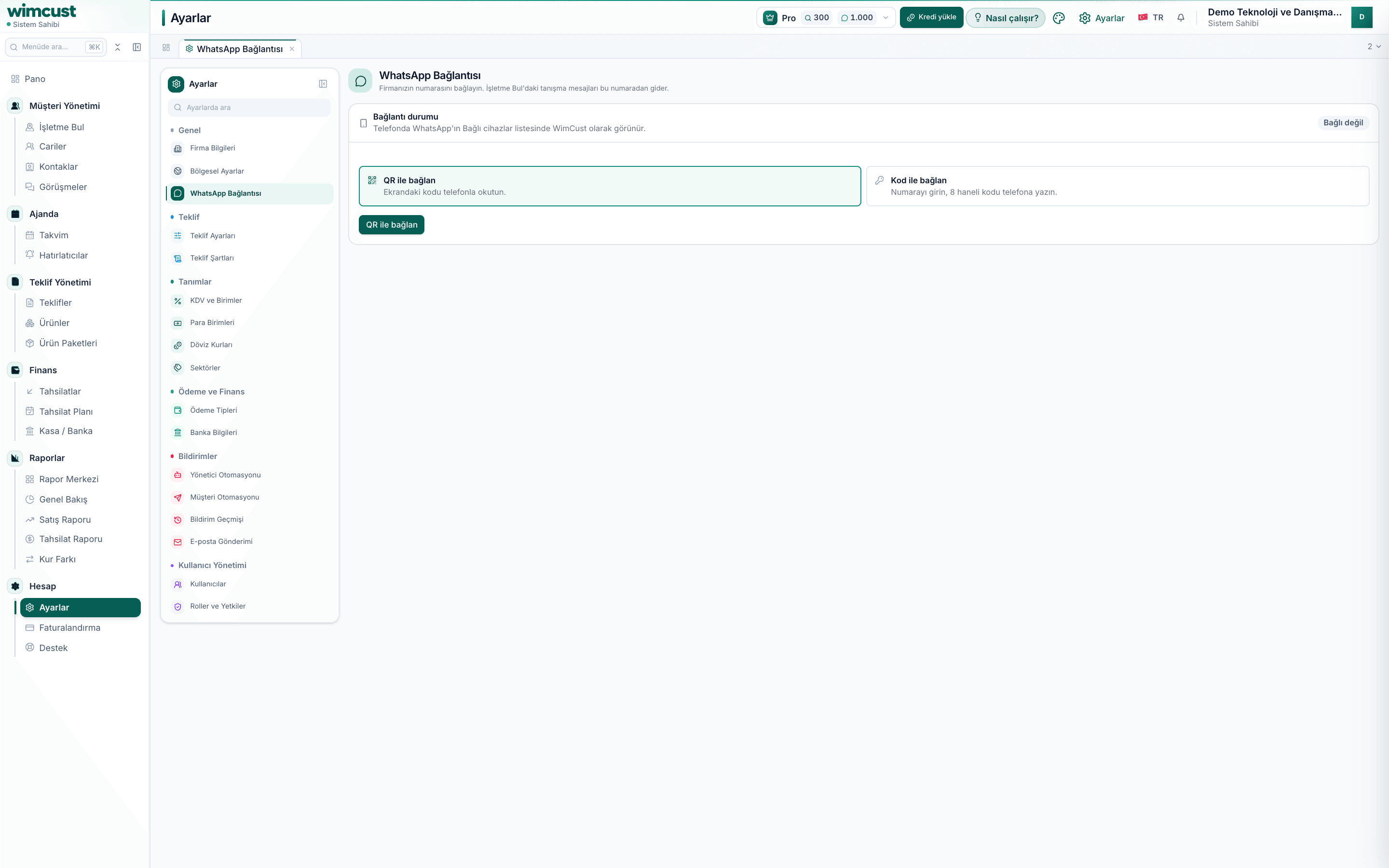
On the Settings → WhatsApp Connection screen you scan the QR code with WhatsApp on your phone. The QR is shown only to authorized users. After connecting, messages go out not from a shared platform number but from your company's number; your customer receives the message from the number that knows you. After temporary disconnections the connection is re-established automatically; if you log out, the QR must be scanned again.
What can be sent from WhatsApp?
- Quotes: the send window generates the quote link, the PIN and a ready-made text; you send this ready text to the account itself and its contacts.
- Introduction message: the first message to a prospect you found in Find Businesses.
- Reminders: follow-up reminders and payment due notifications.
- Automation messages: to your team on events such as quote opened, approved or due date approaching; payment receipts and reminders to customers.
The country code is added from the account's country, or from your company's country if there is none. The same quote can be sent to one person on the same channel at most three times; this is how accidental repeated messages are prevented.
Send queue and result
Messages are queued per number with short delays between them. So it can take anywhere from a few seconds to a few minutes for a message to actually be delivered. When the result arrives, the record is updated; on the Notification History screen you see every outgoing WhatsApp and email message, its recipient and its status.
Credits
Every message sent from your company's number uses one WhatsApp credit. If a message cannot be queued or sending fails, the credit is refunded. When your plan's monthly allowance runs out, you can buy extra credits.
Example flow: sending a quote
- Press the Send button on the quote detail.
- The window brings up the quote link, the PIN if any, and a ready-made text in your company's language.
- Choose the account and its active contacts as recipients; the text is the system's ready message and cannot be edited.
- Select WhatsApp and send; the message is queued from your company's number.
- When the customer opens, approves or rejects the link, your team gets a notification if automation is on.
Notifying the team
In manager automation you set the recipients separately for each event and each channel. For example, when a quote is approved, WhatsApp can go to the sales manager and email to accounting. Message texts are personalized with variables and start out in your company's language.
Together with email
WhatsApp is not the only channel. Email can also be selected from the same send window; if you wish, email goes out from your company's own SMTP server. In automations you switch WhatsApp and email on and off separately for each event. So, for example, you can set up an arrangement that sends WhatsApp to the customer and email to accounting. Messages on both outgoing channels are listed on the same Notification History screen.
Care in messaging
The delays between sends are there to protect the health of your number. Still, send cold messages in moderation and respect the recipient's consent and preferences. This is also why introduction messages go from your company's number: one company's complained-about messages do not affect other companies' notifications.
Details: WhatsApp integration, automation, e-Quote.
Features used in this solution
WhatsApp Integration: Customer Communication From Your Company's Number
Connect your company's WhatsApp number with a QR code; send quote links, intro messages, automation and reminders from your CRM.
See detailsAutomation: The Right Message to the Right Person When an Event Happens
With admin and customer automation, send email and WhatsApp notifications on quote and payment events using ready-made system texts.
See detailsOnline Quotes: A Quote Link and the Customer's Signed Approval
Send your quote by WhatsApp or email as a PIN-protected online link; the customer approves or rejects it on a single screen.
See detailsBusiness Finder: Find Prospects on Google Maps
Scan Google Maps businesses by industry and location, filter them, see them on the map and move them to accounts with one click.
See detailsFrequently asked questions
Do I need a WhatsApp Business account?
You connect your company's WhatsApp number with a QR code; no separate official API key is needed.
Are messages sent instantly?
Messages are queued with delays between them; delivery can take a few minutes.
Do incoming messages land in the CRM?
WimCust records outgoing messages; tracking of incoming conversations is not among the described features.
Other solutions
Switching from Excel to a CRM
Move your Excel customer list into WimCust with a preview import; go beyond Excel's limits with conversation history, reminders, quotes and team permissions.
See detailsCRM Software for Small and Mid-Sized Sales Teams
WimCust CRM software: lead generation, account tracking, conversations and calendar, quotes and e-Quote, payment collection, WhatsApp, automation, reports and a mobile app on one platform.
See detailsSales Team Management Software
Sales team management with WimCust: rep portfolios, roles and permissions, portfolio transfer, team calendar and rep scorecard reports.
See detailsSign up and find your first 60 prospects for free
Start today and find your first customer this week
The Starter plan is free forever. Open your account without a credit card and create your first customer card in minutes.