

Solution
Lead Generation Software for Local Businesses
Scan Google Maps for businesses by industry and area, collect the prospects in one pool and turn them into customer accounts.
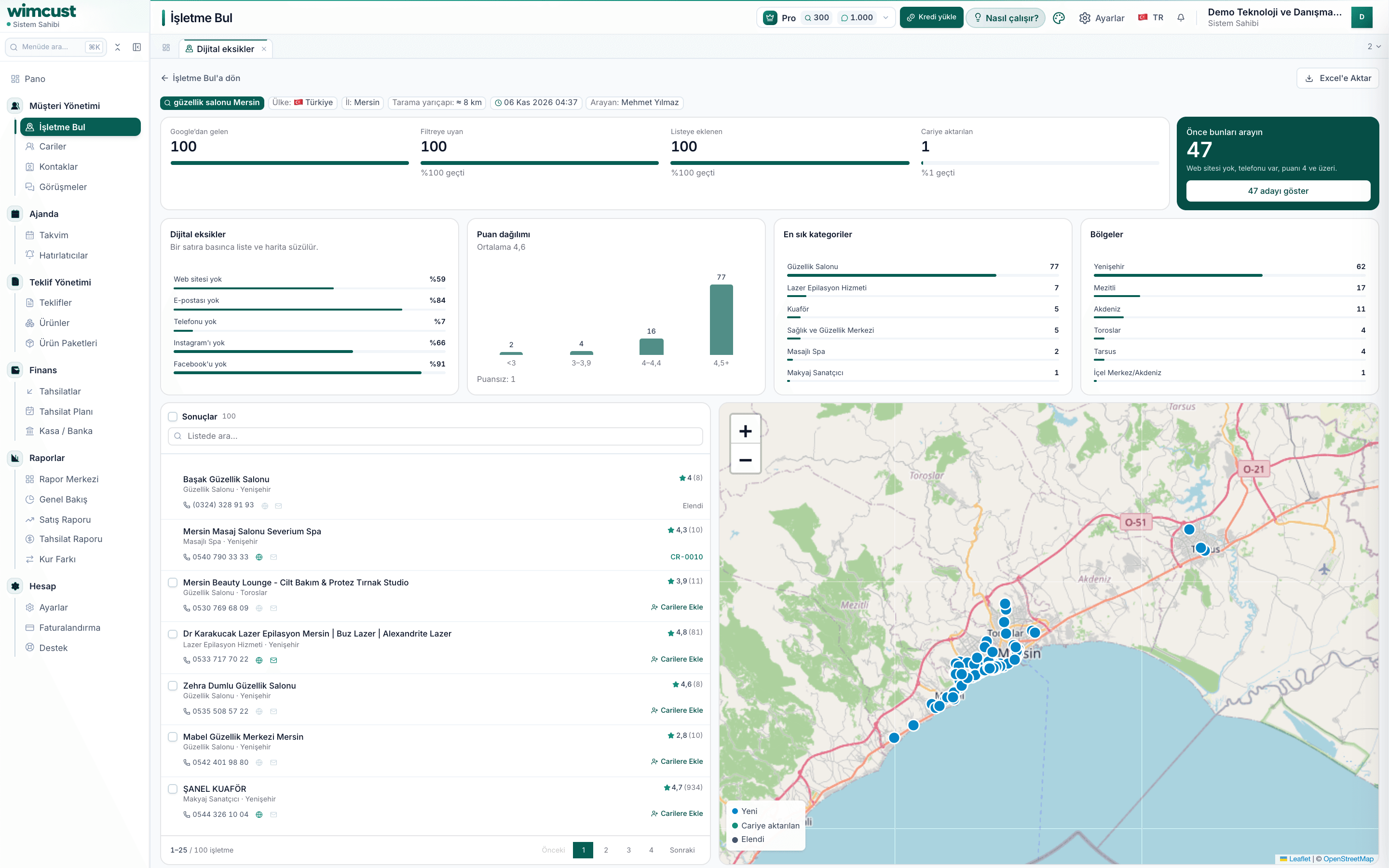
Pick an industry and a location in WimCust Find Businesses, list businesses with or without a phone or website, see them on a map and import them as customer accounts in one click.
Sound familiar?
If you face these problems, you are in the right place
- Searching the internet for businesses in your target area one by one takes hours.
- Phone numbers found end up scattered across Excel files and the team calls the same business twice.
- You cannot track who was contacted and who showed interest.
- Moving from a list to a customer record means retyping everything by hand.
With WimCust
How we solve it
Multi-industry scanning
Scan up to six industries in a single search within the location and radius you choose.
Map and list together
Business list on the left, map on the right; rows and map points highlight each other.
Smart filters
Filter by rating, review count, and whether a website, phone or email exists.
One-click accounts
Import a prospect as a customer account one by one or in bulk.
WhatsApp introduction message
Send the first message from your company's own number.
If you are looking for lead generation software, what you probably need is this: get a list of target businesses in your area quickly, share that list with your team, and keep track of who you called and who you quoted. WimCust brings these three steps together on one screen. In Find Businesses you type what you are looking for and where; the system scans the businesses on Google Maps and writes the results to your company's shared prospect pool.
Scan by industry and location
You can select up to six industries in a single search; for example "optician", "dental clinic" and "veterinarian" can be scanned together. You set the location by choosing a region or by dropping a pin on the map; the radius is adjustable from 0.5 to 25 km. The location text and the map are a single piece of information: the city you type moves the map there, and the point you click on the map updates the location name. The search depends on the country, not on the interface language; when you scan a region outside your own country, the industry term is sent in that country's language.
Filter and prioritize the results
The scan settings include filters such as rating range, minimum number of reviews, businesses without a website and businesses that are open now. Once the list arrives, the Filter panel lets you separate businesses that have or lack a phone number, website or email; the table and map change together. The "digital footprint" indicator on each row shows phone, web, email and social media presence at a glance. New prospects with a phone number, no website and a high rating are highlighted by the "priority prospect" rule.
From pool to customer account
The prospect pool is open to the whole company: everyone on the team sees a business that is not yet anyone's customer. When you import a prospect to an account, one by one or in bulk, the record joins the importing person's portfolio and is immediately open to conversation, quote and payment tracking like any customer account. If an account with the same phone number already exists, the system shows a duplicate warning; it does not block you, the decision is yours. Prospects you rule out leave the list, so you never evaluate the same business twice.
First contact on WhatsApp
If you have connected your company's WhatsApp number, you can send the introduction message to a prospect directly from the Find Businesses screen. The message goes out from your own number, not from a shared platform number. Sending a second message to the same prospect requires extra confirmation; the counts in the search header show how many prospects you can write to, how many messages were sent and which prospects could not be reached.
Controlled use with credits
Scanning runs on credits: each business Find Businesses adds to your pool for the first time uses one scan credit. If your plan's monthly allowance runs out, you can buy extra credits. You can also try it on the free Starter plan. For details see the Find Businesses feature and the prospect list page.
Lead generation on mobile
If you work in the field, the same search bar is in the mobile app: you choose what you are looking for, where, and the scan settings. Marking a spot on the map is a separate mode, so the search center does not shift by accident while you browse the map. The map on the home screen shows your accounts and the prospects not yet evaluated together, so you see the opportunities around you on the spot.
Who is it for?
For any team that sells to local businesses in a specific area: software and digital agencies, wholesalers, manufacturers building a dealer network, service providers. If you can find your target customers on Google Maps by an industry name, WimCust turns that list into something organized and trackable. One important note: the scan returns only the information businesses publish publicly on Google; complying with the applicable regulations when you contact the people you reach is your responsibility.
Features used in this solution
Business Finder: Find Prospects on Google Maps
Scan Google Maps businesses by industry and location, filter them, see them on the map and move them to accounts with one click.
See detailsCustomer Account Tracking: Account Card, Contacts and Portfolio in One Place
Manage customer and supplier accounts, contacts, documents and rep portfolios on one screen with WimCust account tracking.
See detailsWhatsApp Integration: Customer Communication From Your Company's Number
Connect your company's WhatsApp number with a QR code; send quote links, intro messages, automation and reminders from your CRM.
See detailsWimCust Mobile: Your CRM in the Field, in Your Pocket
With the WimCust mobile app, see your customers on the map, log contacts, manage your calendar, send quotes and find businesses in the field.
See detailsFrequently asked questions
Which source does Find Businesses use?
First from the WimCust business database (open business data and earlier searches); if that is not enough, from public business listings on Google Maps. Whatever the source, each business entering your pool for the first time costs 1 credit.
How many industries can I scan in one search?
Up to six industries. Each business added to your pool for the first time uses one scan credit.
Can the same business be imported as an account twice?
If an account with the same phone number exists, a duplicate warning appears; the import is not blocked, the decision is yours.
Can I do lead generation with the free plan?
Yes, the Starter plan is free; scan allowance depends on the plan's credit definition, and you can buy extra credits if needed.
Other solutions
Switching from Excel to a CRM
Move your Excel customer list into WimCust with a preview import; go beyond Excel's limits with conversation history, reminders, quotes and team permissions.
See detailsCRM Software for Small and Mid-Sized Sales Teams
WimCust CRM software: lead generation, account tracking, conversations and calendar, quotes and e-Quote, payment collection, WhatsApp, automation, reports and a mobile app on one platform.
See detailsWhatsApp CRM for Customer Follow-Up
Send quote links, introduction messages and automatic reminders from your company's own WhatsApp number in WimCust; every message stays logged in notification history.
See detailsSign up and find your first 60 prospects for free
Start today and find your first customer this week
The Starter plan is free forever. Open your account without a credit card and create your first customer card in minutes.