

Solution
Quote Software for Sales Teams
Add items from your catalog, leave tax, discount and currency math to the system and send the quote with an online link.
WimCust quote software: product catalog, tax, discounts, multi-currency items, revisions, PDF and an e-Quote link the customer approves online.
Sound familiar?
If you face these problems, you are in the right place
- Tax and discount math in Excel templates is done by hand and errors slip through.
- Nobody knows which version of which quote was sent.
- You cannot tell whether the customer opened or approved the quote.
- For foreign-currency items, the exchange rate is looked up separately every time.
With WimCust
How we solve it
Product catalog
Pick items from the catalog; free lines get linked to the catalog.
Accurate tax math
Tax, withholding and discounts are calculated on the server.
Multi-currency quotes
Per-line currency and rate, with TCMB/ECB suggestions.
e-Quote link
PIN-protected link, with the customer's online approval and its audit trail.
Revision history
The old version is kept on every revision, and the number stays the same.
PDF and printing
Ready-made designs, plus color and layout settings.
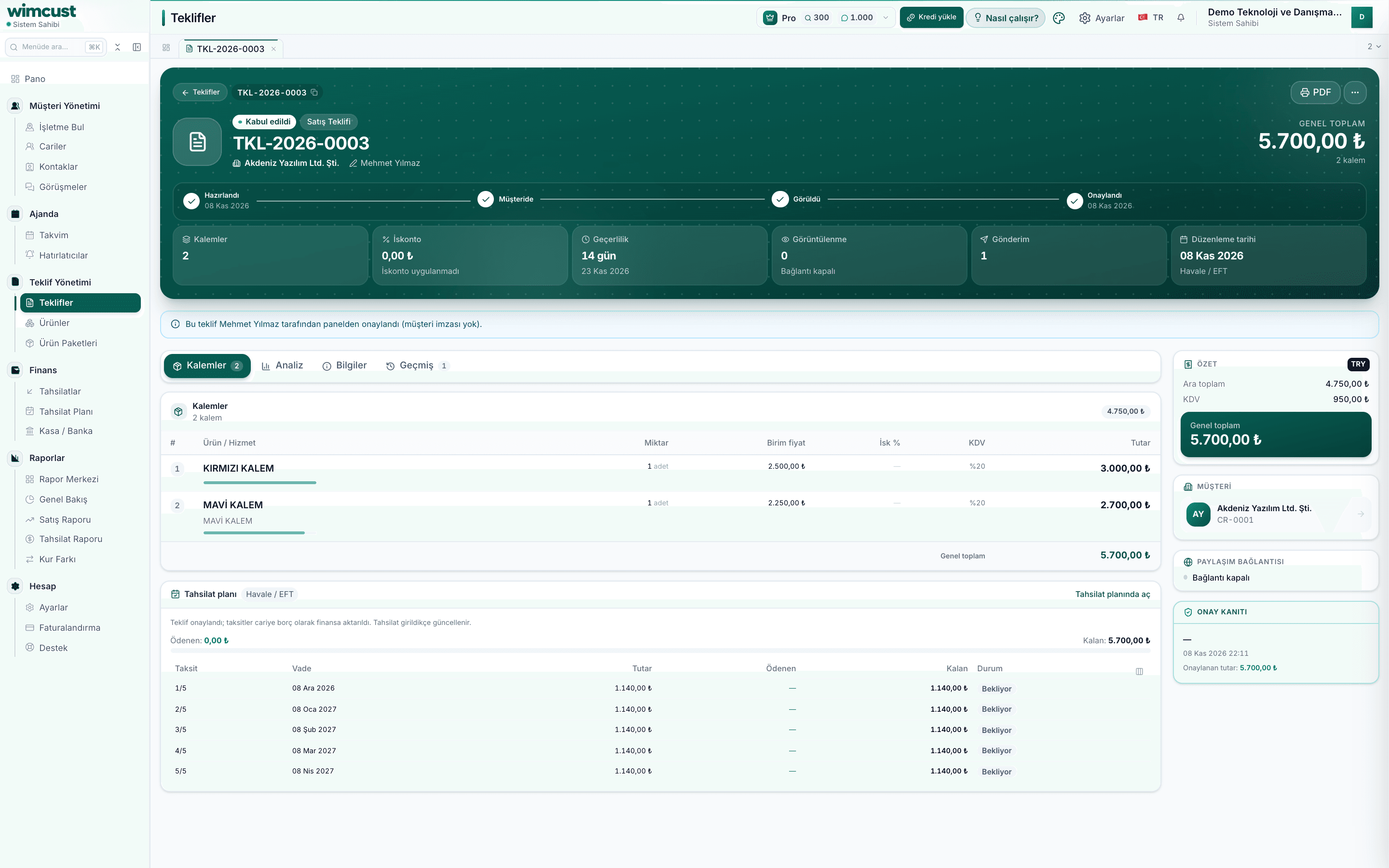
Preparing quotes with a Word or Excel template is prone to small errors: a wrong tax rate, a rounding difference, an old price, a lost revision. As quote software, WimCust ties the quote to the customer account, calculates the amounts on the server and records every step from sending to approval.
From catalog to line item
You define your products and services once in the catalog: name, unit, tax rate, price and currency. A line item added to a quote copies this information; even if the catalog changes later, past quotes stay exactly as they were. You can type an item that is not in the catalog as a free line; when the quote is saved it links to a product of the same name if one exists, otherwise an authorized user gets a new product in the catalog. Items often sold together can be stored as a product bundle and added to a quote in one go.
The math is done for you
- Line and document discounts; the document discount is distributed proportionally across line bases.
- Tax per line, with different rates in the same quote.
- Withholding deductions: tevkifat (applied on the tax amount) and stopaj (applied on the base), which apply to Turkish accounts.
- Multi-currency lines: each line carries its own currency and rate, and the rate is suggested from TCMB or ECB depending on your country.
- Payment plan and late-payment surcharge: the surcharge rate for the number of installments comes from a rate table.
Amounts sent by the client are never read; totals are recalculated on the server on every save. The live preview on screen uses the same formula.
Sending and approval
You share the finished quote with an e-Quote link. The link can be protected with a PIN; the customer opens the quote in their browser, reviews it and approves or rejects it by typing their name. At the moment of approval the IP address and device information are recorded and the link closes. From the send window you can send to several people by WhatsApp (from your company's number) or email. If the customer said "OK" by phone, you can also process the approval from the panel; the source is recorded separately.
Revision and document
When a sent quote needs changes, you take a revision: a snapshot of the old version is kept and the quote number does not change. You choose the document look from ready-made designs, adjust colors and layout, and download it as a PDF or print it. You bring the terms text from templates.
Quote steps
- Choose the account; the currency defaults to your company's main currency.
- Add items from the catalog or a bundle, or type a free line.
- Choose discount, tax and, if needed, withholding.
- Set the payment method and the collection plan.
- Bring in the quote terms from terms templates.
- Save, check the document view and send.
What the customer sees and what they do not
The description field on a quote is visible to the customer, while the internal note field belongs to your team alone. The internal note appears neither on the e-Quote page, nor on the print page, nor in the PDF. So you can safely keep negotiation notes or cost information inside the quote. Quote numbers are issued in sequence within your company.
Validity and expired quotes
Every quote has a validity date. When the date passes, the customer link closes by itself and the quote is marked as expired. If you turned on customer automation, the customer gets a reminder for a quote about to expire; with manager automation your team is also informed about expired quotes. This way, unanswered quotes do not disappear in the list.
For details see the quote management, e-Quote and quote design and printing pages.
Features used in this solution
Quote Management: The Right Quote From Your Catalog in Minutes
Build quotes from your product catalog: foreign-currency lines, discounts, VAT, withholdings and revision tracking in one form.
See detailsOnline Quotes: A Quote Link and the Customer's Signed Approval
Send your quote by WhatsApp or email as a PIN-protected online link; the customer approves or rejects it on a single screen.
See detailsQuote Design, PDF and Printing
Pick a ready-made document template or save your own quote design; the quote prints and converts to PDF with the same look.
See detailsProduct Catalog: Products, Categories and Bundles
Define products and services with price, unit, VAT and currency; speed up quotes with an unlimited category tree and product bundles.
See detailsMulti-Language and Multi-Currency: 13 Languages, Automatic Rates, Per-Line Currency
WimCust works in 13 languages; your main currency follows your country, rates come automatically from the TCMB or ECB, and quote lines can be in foreign currency.
See detailsFrequently asked questions
Can a quote be downloaded as a PDF?
Yes, a PDF is generated with the design you chose, and the print page uses the same look.
How does the customer approve a quote?
They open the e-Quote link, enter the PIN if required, and approve or reject by typing their name.
Can an approved quote be changed?
An approved, rejected, expired or cancelled quote cannot be edited; if an authorized user reverses the decision, the quote returns to draft and the signature is carried into the revision.
Is the number of quotes per month limited?
It depends on your plan; it can be unlimited in the plan definition.
Other solutions
Switching from Excel to a CRM
Move your Excel customer list into WimCust with a preview import; go beyond Excel's limits with conversation history, reminders, quotes and team permissions.
See detailsCRM Software for Small and Mid-Sized Sales Teams
WimCust CRM software: lead generation, account tracking, conversations and calendar, quotes and e-Quote, payment collection, WhatsApp, automation, reports and a mobile app on one platform.
See detailsWhatsApp CRM for Customer Follow-Up
Send quote links, introduction messages and automatic reminders from your company's own WhatsApp number in WimCust; every message stays logged in notification history.
See detailsSign up and find your first 60 prospects for free
Start today and find your first customer this week
The Starter plan is free forever. Open your account without a credit card and create your first customer card in minutes.