

Solution
Switching from Excel to a CRM
Import your customer list in minutes and gain the follow-up, reminders and team scoping that Excel cannot give you.
Move your Excel customer list into WimCust with a preview import; go beyond Excel's limits with conversation history, reminders, quotes and team permissions.
Sound familiar?
If you face these problems, you are in the right place
- Multiple versions of the Excel file are circulating.
- Conversation notes and reminders cannot be tracked in a sheet.
- Everyone who opens the file sees all customers.
- Quote formulas break as they get copied.
With WimCust
How we solve it
Preview import
Errors show before saving; nothing is written by accident.
Duplicate matching
Code, tax number and company name prevent duplicate records.
Conversation history
Unlimited contact records for every customer.
Reminders
Follow-up dates in the calendar and notifications.
Export to Excel
Lists and reports still come out as Excel.
Many companies start customer tracking with an Excel sheet. It is enough up to a point; then copies of the file multiply, nobody knows who updated which version, and conversation notes no longer fit in cells. Using a CRM instead of Excel does not mean throwing that sheet away, it means moving it into a living system.
Where Excel struggles
- History: dozens of conversations with one customer cannot be held in a single cell.
- Reminders: a sheet does not tell you "call this customer tomorrow".
- Permissions: everyone who opens the file sees every row and every column.
- Concurrency: when two people edit at the same time, versions clash.
- Calculations: quote and tax formulas break as they get copied.
Moving your list is easy
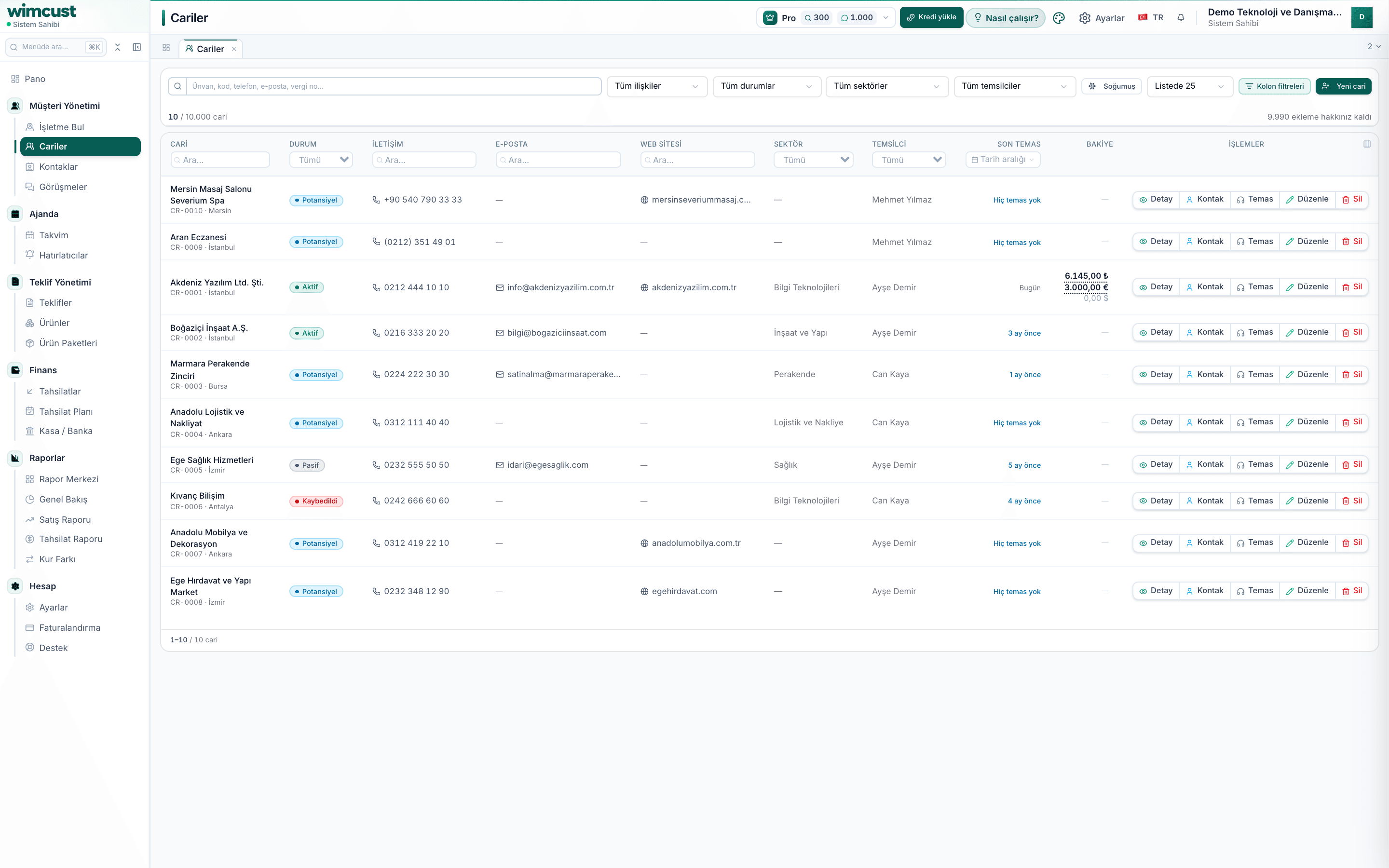
In WimCust the account list is imported from an Excel or CSV file. You can download the template and fill it in or upload your existing file. The import has two steps: the preview reads the file and shows problem rows and writes nothing; when you confirm, the file is read again and written in one go. Duplicates are matched by code, tax number and company name, so the same customer is not created twice. Different number formats such as "250.000,00" and "1,234.56" are read correctly; if the file has a new industry, it is created automatically.
What you gain after moving
Each customer becomes an account card: contacts, conversation history, quotes, documents and movements. The last contact date is calculated automatically from conversations; follow-up reminders are collected in the calendar and notified on time. Reps see only their own portfolio. Quotes are prepared from the catalog, and tax calculation is done on the server.
You do not break away from Excel entirely
You can export the account list to Excel with the filters on screen, and download reports and Report Center breakdowns as Excel files. Numbers are written as numbers, so you do not need to reformat them. Your accountant or manager keeps receiving the sheet they are used to.
Recommended order for the switch
- Arrange your Excel file so each customer is a single row; add a tax number column if possible.
- Download WimCust's import template and match the columns.
- Check the errors in the preview and fix the file.
- Apply the import, then bulk-assign the accounts to reps.
- In the first week, start entering conversations in WimCust so reminders land in the calendar.
If you follow this order, your old sheet stays as a reference archive while daily work runs in the CRM.
Phone numbers and contact details
Multiple phone numbers written in one Excel cell separated by commas are saved separately in the CRM and each one can be dialed. The account list searches by phone, email, tax number and code; accounts with missing contact details can still be saved, and the form only shows a warning. Importing phone numbers completely will make it easier later when you send quotes and reminders by WhatsApp.
What changes for the team?
In Excel you had to ask who called a customer; in a CRM the answer is on the card. A rep sees their own list, a manager sees the whole team. When a customer is handed from one rep to another, the history goes with them. A new teammate can read the customer's whole story on day one.
The Starter plan is free; you can import your existing list and try it. Details: account tracking, reports, account tracking software.
Features used in this solution
Customer Account Tracking: Account Card, Contacts and Portfolio in One Place
Manage customer and supplier accounts, contacts, documents and rep portfolios on one screen with WimCust account tracking.
See detailsReports and Report Center: Measure Sales, Collections and Your Team
Sales funnel, conversion, rep scorecard, collection ageing and exchange difference reports; detailed breakdowns and Excel from the Report Center.
See detailsCalendar and Reminders: Never Forget a Customer Follow-Up
Plan customer follow-ups in the calendar, complete or postpone them. Reminders arrive as panel notifications, email and WhatsApp.
See detailsInteraction Tracking: Every Call, Visit and Meeting on Record
Log calls, meetings, emails and visits on the account; contact history, last contact date and cold-customer alerts build up automatically.
See detailsFrequently asked questions
What if my Excel file's format does not fit?
The preview shows which rows could not be read and why; you can fix the file and upload it again.
Can the same customer be imported twice?
Duplicates are matched by code, tax number and company name.
Is Excel export available in every plan?
Excel export depends on the plan settings.
Other solutions
CRM Software for Small and Mid-Sized Sales Teams
WimCust CRM software: lead generation, account tracking, conversations and calendar, quotes and e-Quote, payment collection, WhatsApp, automation, reports and a mobile app on one platform.
See detailsWhatsApp CRM for Customer Follow-Up
Send quote links, introduction messages and automatic reminders from your company's own WhatsApp number in WimCust; every message stays logged in notification history.
See detailsSales Team Management Software
Sales team management with WimCust: rep portfolios, roles and permissions, portfolio transfer, team calendar and rep scorecard reports.
See detailsSign up and find your first 60 prospects for free
Start today and find your first customer this week
The Starter plan is free forever. Open your account without a credit card and create your first customer card in minutes.