

Sales
Product Catalog: Products, Categories and Bundles
Define the products and services you sell once; pick them in seconds when preparing a quote.
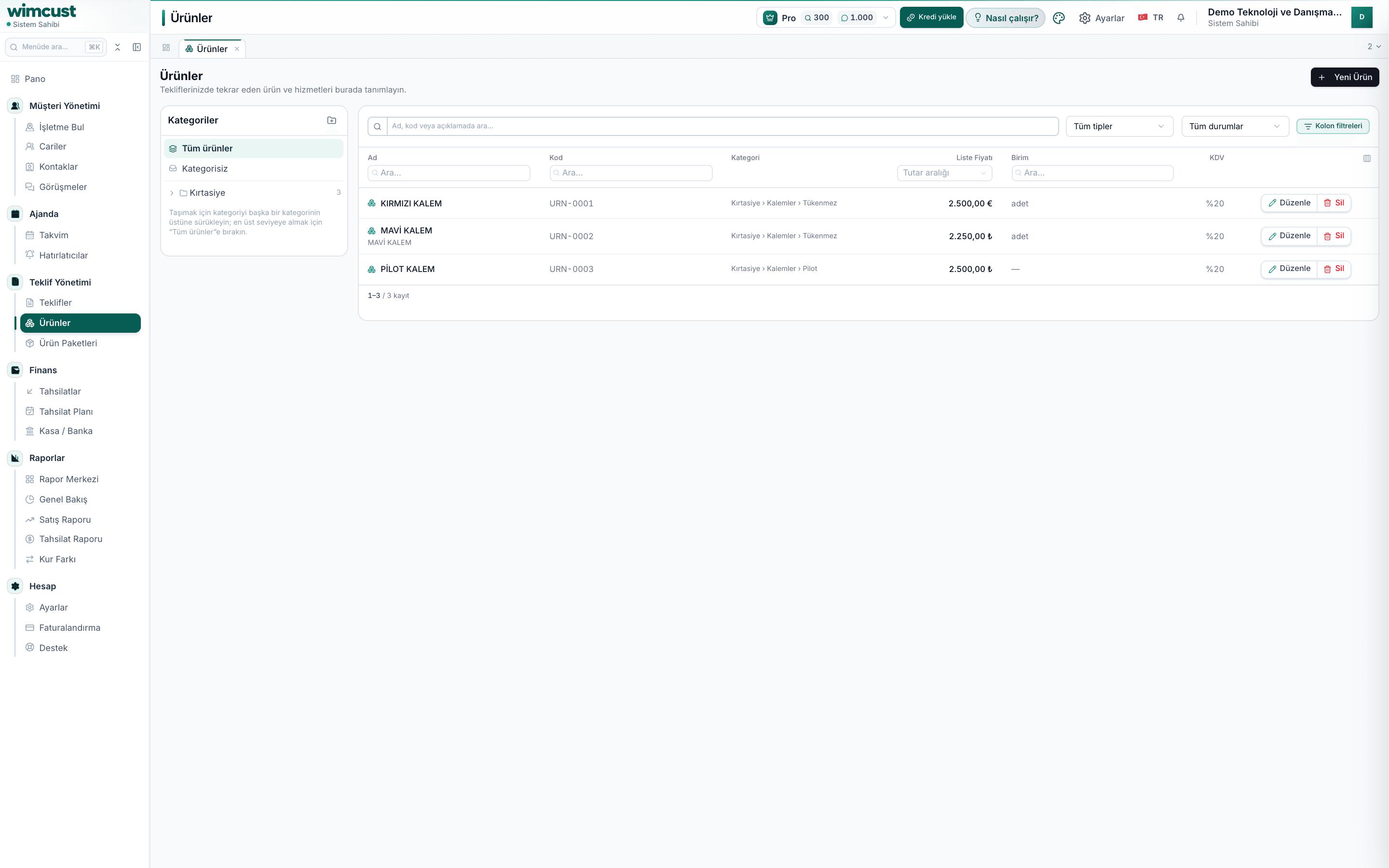
Define products and services with price, unit, VAT and currency; speed up quotes with an unlimited category tree and product bundles.
Features
What can you do with Product Catalog?
Complete product card
Name, unit, price, currency and a mandatory VAT rate.
Foreign-currency pricing
A product stays in its own currency and is converted at the rate in the quote.
Unlimited category tree
Deleting deletes nothing; sub-branches move up one level.
Product bundles
Groups of frequently sold items are added to a quote in one go.
A catalog that grows with quotes
A free-form line is linked to a product with the same name when saved, or a product is created.
How it works
Step by step
- 1
Set up definitions
Check your units and tax rates.
- 2
Add products
Define products and services together with their categories.
- 3
Build bundles
Bundle items that are often sold together.
- 4
Pick them in a quote
Add from the catalog or a bundle in the quote form.
Retyping the same product in every quote wastes time and is a source of errors: the wrong VAT rate one day, an old price the next. WimCust's product catalog lets you define the products and services you sell once and pick them from a list when preparing a quote.
The product card
Every product carries a name, unit, price, currency and VAT rate. The VAT rate is mandatory; for a tax-free product, "Exempt (0%)" is chosen. This small rule prevents, from the start, a product with a blank tax rate being calculated wrongly in a quote.
The catalog is specific to your company; it never mixes with another company's products. WimCust is not an inventory program; no stock quantity is kept in the catalog. The aim is to speed up the quoting and sales process.
Foreign-currency products
A product's price is entered in its own currency: a dollar-based product stays at its dollar price. When added to a quote, the product's currency is locked and converted to the document currency at that day's rate. If the rate is unknown, the line is not saved, so a price is never given at a rate of 1 by mistake.
Units and tax rates
Units such as piece, metre, kilogram and hour, and tax rates, are managed under Settings → Definitions. The platform's general definitions come ready; your company can add its own units and rates.
Categories: a tree of unlimited depth
You can organize your products with a category tree: for example Electrical → Cables → Power cables. There is no depth limit. A few rules keep the tree consistent:
- Two categories with the same name cannot be created under the same parent category (differences in letter case and accents are ignored).
- A category cannot be moved into its own sub-branch.
- Deleting a category deletes nothing: its sub-branches and products move up one level.
- When you select a category in the product list, products in the sub-branches are listed as well.
Product bundles
For items often sold together you can create a product bundle: for example "Starter setup kit" or "Annual maintenance package". When you add the bundle to a quote, the items inside arrive in one go.
A bundle is a template, not a link. Once added to a quote, the lines are independent: you can change the quantity or remove a line. Changing or deleting the bundle later does not affect past quotes.
A catalog that grows with your quotes
You do not have to build the catalog completely from the start. You can type an item that is not in the catalog as a free-form line in a quote. When the quote is saved:
- If a product with the same name exists (ignoring differences in letter case and spacing), the line is linked to it.
- If not, a new product is created; only the quote of a user with permission to manage the catalog does this.
- The price of an existing product is not overwritten by the negotiated price in the quote.
The suggestion list in the quote form uses the same matching; when you start typing an item, similar products are suggested.
Past quotes are preserved
A quote line copies the product's name, unit and tax rate. When you update a product's price or delete the product, quotes that have been sent and approved stay exactly as they were. The link to the product is only for tracking; it is where "which product sold how much" comes from in the sales reports.
Permissions
Viewing the catalog and managing it are separate permissions. A rep can view products and add them to a quote; adding products, changing prices and editing categories require the catalog management permission. You set permissions on the roles screen.
Catalog on mobile
In the mobile app products are listed; if you have permission you can add and edit products, otherwise the list opens read-only.
How should you set up the catalog?
Start with the 20 to 30 items you sell most, and let quotes grow the rest. Write product names in a way the customer will understand, because the name is copied exactly into the quote and PDF. Define the products you buy in foreign currency in their own currency; you will not have to update the price every time the rate changes. Build the category tree around the logic your sales team searches by, not around accounting codes. Bundling items that are often sold together both shortens quote time and reduces the risk of a forgotten line.
Frequently asked about Product Catalog
Does WimCust track inventory?
No. The product catalog is kept for quoting and sales; stock quantity is not tracked.
If I change a product's price, do older quotes change?
No. A quote line copies the product details; quotes that have been sent and approved stay exactly as they were.
What happens to the products in a category if I delete it?
Products and sub-categories move up one level; nothing is deleted.
Can a rep add products?
Adding products requires the catalog management permission. If that permission is not given in the role, the rep can only view the catalog and add items to a quote.
Features used together
Quote Design, PDF and Printing
Pick a ready-made document template or save your own quote design; the quote prints and converts to PDF with the same look.
See detailsOnline Quotes: A Quote Link and the Customer's Signed Approval
Send your quote by WhatsApp or email as a PIN-protected online link; the customer approves or rejects it on a single screen.
See detailsQuote Management: The Right Quote From Your Catalog in Minutes
Build quotes from your product catalog: foreign-currency lines, discounts, VAT, withholdings and revision tracking in one form.
See detailsSign up and find your first 60 prospects for free
Try Product Catalog today
The Starter plan is free forever. Open your account without a credit card and create your first customer card in minutes.