

Customers
Interaction Tracking: Every Call, Visit and Meeting on Record
Every touchpoint with a customer is written to the account's history; the system reminds you when a customer goes cold.
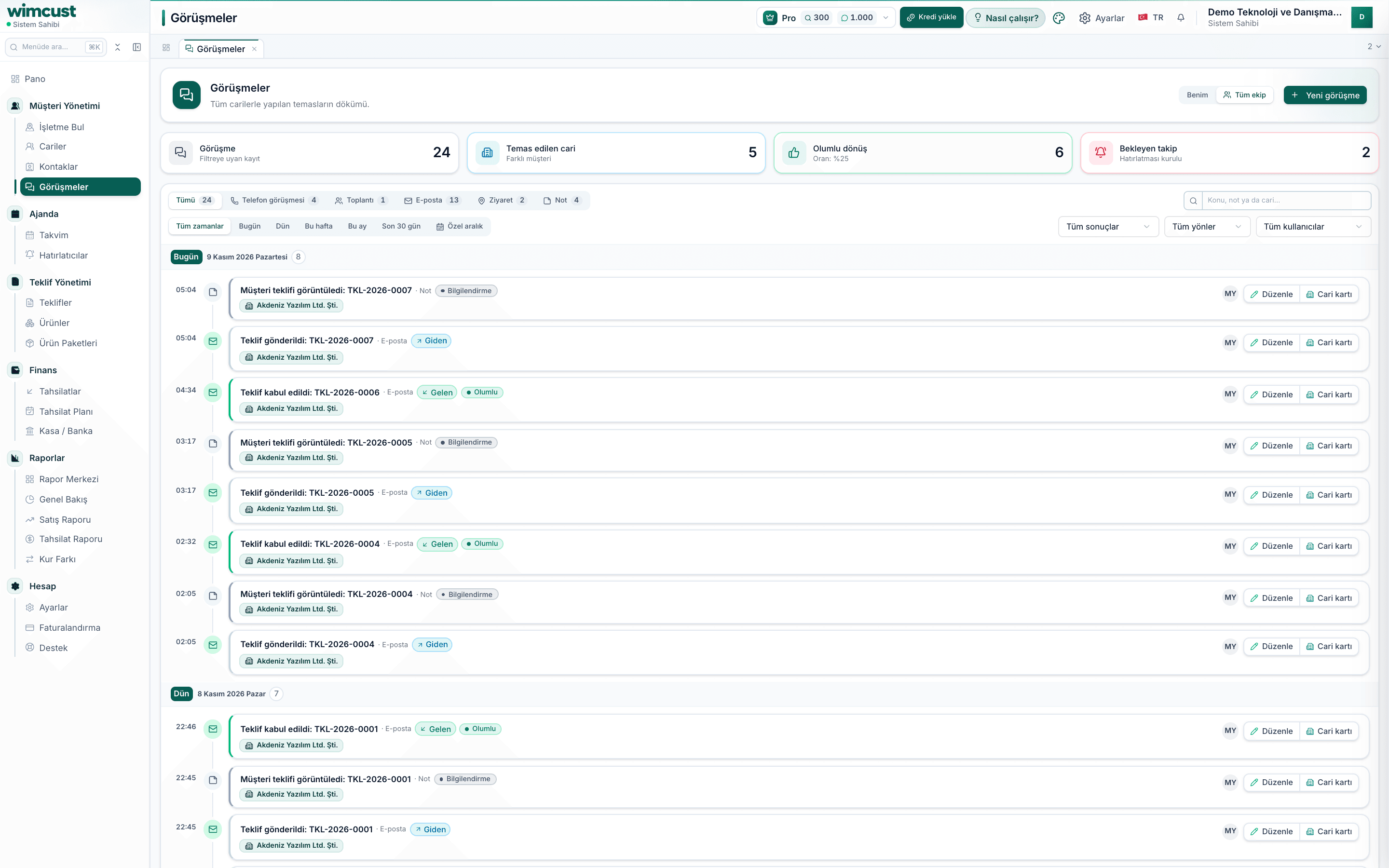
Log calls, meetings, emails and visits on the account; contact history, last contact date and cold-customer alerts build up automatically.
Features
What can you do with Interaction Tracking?
Five interaction types
Calls, meetings, emails, visits and internal notes are logged as separate types.
Follow-up reminder
Add the next step to your calendar from the interaction form.
Automatic last contact
Notes and future-dated records are not counted; the date always tells the truth.
Cold-customer alert
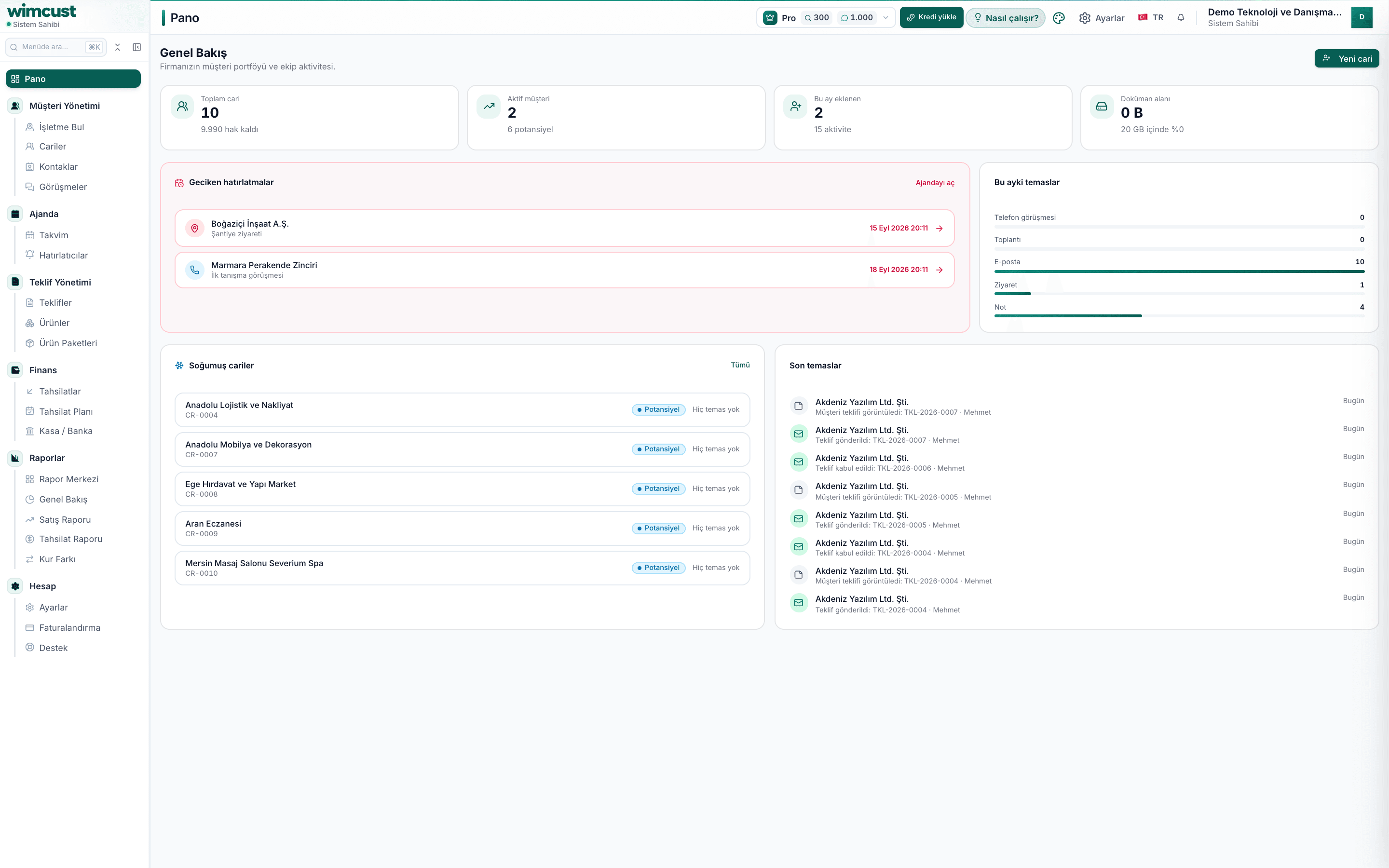
Accounts not contacted for a long time and overdue follow-ups are on the dashboard.
Shared memory
Anyone who opens the card sees the last conversation and who is handling the account.
How it works
Step by step
- 1
Open the account
Go to the customer's card on web or mobile.
- 2
Log the contact
Enter the type, date, subject and note.
- 3
Plan the next step
Set a follow-up reminder from the same form.
- 4
Track from the dashboard
Cold accounts and overdue follow-ups are in front of you every morning.
A sale rarely closes in a single conversation. When did you last call the customer, what did you discuss, what was the next step? When this information stays in a rep's head or notebook, it is lost when the rep goes on leave or leaves the company. WimCust's interaction tracking writes every touchpoint to the account's card and turns it into the team's shared memory.
Which interactions are logged?
An interaction record carries a type, date, subject and note. The types match everyday sales work:
- Call - a phone conversation
- Meeting - in person or online
- Email - an important correspondence
- Visit - a conversation held at the customer's location
- Note - internal information, not contact with the customer
So that no record stays empty, at least one of the subject or note fields must be filled in. While logging the interaction you can also set a follow-up reminder from the same form: for example, "Call Thursday at 10:00 to confirm the price". The reminder lands in your calendar and you are notified when the time comes. See the calendar and reminders page for details.
Contact history
The interactions tab in the account detail shows every conversation held with that customer in date order. When the customer calls, anyone who opens the card sees what the last conversation was, which quote is pending and who is handling the account. Who entered which record is stored with the record as well.
Interactions are also gathered in their own list. Here you can filter the interactions of all accounts by date, type and rep. A user in the rep role sees only the interactions of accounts in their own portfolio.
Why is last contact automatic?
Every account card has a last contact date, and this field is not typed in by hand; as interactions are added, edited or deleted, the system recalculates it. Two rules keep this date realistic:
- Records of the note type do not count as contact. An internal note like "this company is price sensitive" does not mean you spoke with the customer.
- Future-dated records do not count as contact. A meeting planned for next week is not yet a contact that has happened.
That way the last contact date is an honest answer to the question "when did we really last speak with this customer?"
Do not miss the customer who goes cold
Accounts that have not been contacted for a long time stand out on the dashboard and on the mobile app's summary screen as cold accounts. Overdue follow-ups are listed in the same place. A rep who opens the dashboard in the morning sees whom to call during the day without keeping a separate list.
How it shows up in reports
Interaction records are the basis of the contact breakdown and the rep scorecard in reports: how many contacts each rep made by type, and how contacts changed over time. A manager uses this report not to blame people but to balance workload and see which customers are not getting attention.
Logging from the field
Entering the record after a visit once you are back in the office is often forgotten. In the mobile app, a contact record and a follow-up reminder are created right on the phone from the account detail; from the same screen you can call the customer, write on WhatsApp or send an email.
Who is it for?
Teams that sell by phone, field visitors, consultants who work by appointment and B2B companies with a long sales cycle benefit most from interaction tracking. No matter how many people are on the team, the customer relationship belongs to the company, not to an individual.
How to write a good interaction record
The shorter a record is, the more often it gets entered; but a few pieces of information make it useful. Put the purpose of the conversation in the subject line ("price objection", "demo request") and, in the note, the concrete thing the customer said and the promise you made. If the next step is clear, set the follow-up reminder right away; a reminder you plan to set "later" usually never gets set. If the conversation concerns a quote, also check the quote's status in the same account's quotes tab: has the customer opened the e-quote link, is approval pending?
Once this habit takes hold in the team, the customer is met with the same context no matter which rep they call. Even when the rep changes, the relationship is not interrupted.
Frequently asked about Interaction Tracking
What is the difference between a note and an interaction?
A note is an internal record and does not count as contact with the customer; it does not change the last contact date. Calls, meetings, emails and visits count as contact.
Can I enter a meeting with a future date?
Yes. Until it takes place, however, it does not affect the last contact date, because it is a conversation that has not happened yet.
Can reps see each other's interactions?
Interactions follow the account's portfolio rule. A rep without permission to see all accounts sees only the interactions of their own accounts.
Can I log an interaction from my phone?
Yes, in the mobile app a contact record and a follow-up reminder can be created from the account detail.
Features used together
Calendar and Reminders: Never Forget a Customer Follow-Up
Plan customer follow-ups in the calendar, complete or postpone them. Reminders arrive as panel notifications, email and WhatsApp.
See detailsBusiness Finder: Find Prospects on Google Maps
Scan Google Maps businesses by industry and location, filter them, see them on the map and move them to accounts with one click.
See detailsCustomer Account Tracking: Account Card, Contacts and Portfolio in One Place
Manage customer and supplier accounts, contacts, documents and rep portfolios on one screen with WimCust account tracking.
See detailsSign up and find your first 60 prospects for free
Try Interaction Tracking today
The Starter plan is free forever. Open your account without a credit card and create your first customer card in minutes.