

Platform
WhatsApp Integration: Customer Communication From Your Company's Number
Quotes, reminders, automation and intro messages go out from your own WhatsApp number; every message is on record.
Connect your company's WhatsApp number with a QR code; send quote links, intro messages, automation and reminders from your CRM.
Features
What can you do with WhatsApp Integration?
Your own number
Connected with a QR code; the customer recognizes you and replies to you.
Sending quote links
The online quote link and PIN to several recipients on WhatsApp.
Intro message
A first message to Business Finder prospects, with confirmation before a second.
Automation and reminders
Automatic messages to the team or the customer on events and due dates.
Queued, spaced sending
Messages go one by one with waiting intervals.
Notification history
Every outgoing message is kept for 180 days with its result and text.
How it works
Step by step
- 1
Connect the number
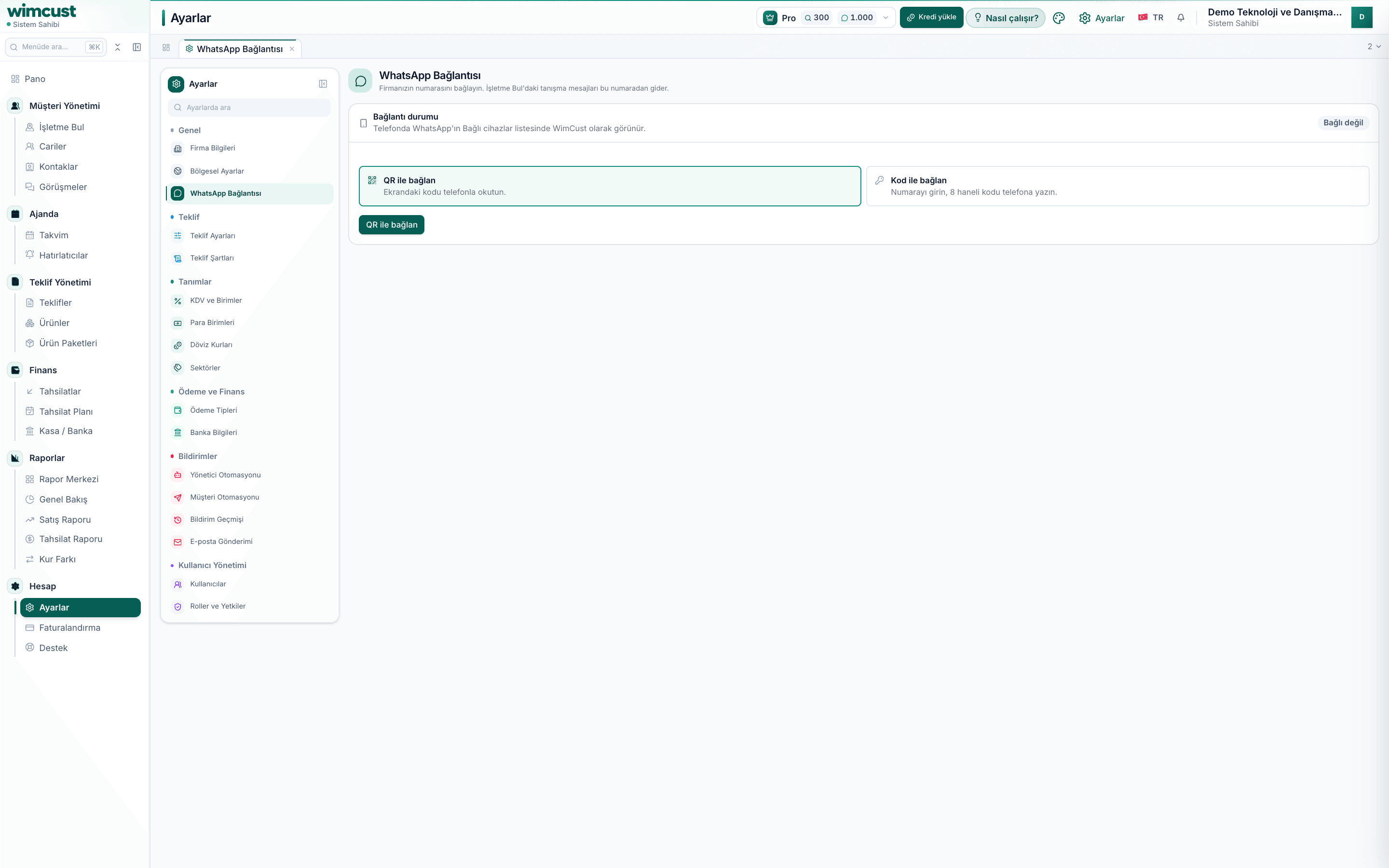
Scan the QR code in Settings → WhatsApp Connection with your phone.
- 2
Turn on where you use it
Turn on the WhatsApp channel in automation and reminders and choose recipients.
- 3
Send and monitor
Send quotes and intro messages, and see the results in notification history.
For many customers, WhatsApp is the most natural way to be reached, often more so than email. WimCust's WhatsApp integration connects your company's own WhatsApp number to the CRM. Quote links, customer reminders, team notifications and intro messages to prospects go out from this number, and every message is kept on record.
Connecting with a QR code
A QR code appears on the Settings → WhatsApp Connection screen. You scan this code with the phone that has your company's WhatsApp number installed, and the connection is made. Only authorized users see the QR code. If you want to close the connection, you log out; to reconnect, the QR is scanned again. After brief drops, the connection re-establishes itself automatically.
Why does each company use its own number?
Messages go out from your number, not from a shared platform number. The customer recognizes you and replies to you. Also, one company's messages do not affect another company's communication.
What is sent from WhatsApp?
- Online quote link - from the quote send window; to the account itself and its contacts. See the online quotes page for details.
- Intro message - to prospects you find with Business Finder. Writing to the same prospect a second time requires separate confirmation.
- Automation messages - to your team on events such as quote opened, approved or due date approaching; payment receipts and reminders to the customer. See automation.
- Reminders - calendar reminders, instalments coming due and payment reminders to the customer.
How does sending work?
Messages are put in a queue and sent one by one with a pause of a few seconds between them. This protects your number from looking like an account that sends many messages in a short time. That is why, in a bulk send, the last message can take a few minutes to go; the real result of each message (sent or failed) is recorded when it arrives.
Numbers are sent with the country code. The country code is taken from the account's country, or from your company's country if there is none; a number written in local format is also converted to the correct format.
Delivery status and reachability
In Business Finder searches, each prospect's message status is tracked separately:
- Queued - waiting in the queue.
- Sent - the message was delivered.
- Failed - a technical error occurred.
- Unreachable - the issue is with the prospect itself: no phone, the number is a landline or the number has no WhatsApp.
Two branches that share the same phone count as a single recipient; the same person is not written to twice.
Notification history
Every outgoing WhatsApp message and email is listed in Settings → Notification History: when, to whom, for which event and what the result was. You can reach the full text of the message from here too. Records are kept for 180 days.
Credits
Every message sent from your company's number uses one WhatsApp credit. If a message cannot be queued or cannot be sent, the credit is refunded. When sending a quote to several recipients, the total credit is checked before sending starts. Automation and reminders are not sent when credits run out; this is recorded. Your plan's monthly allowance renews every month, and you can buy extra credits.
WhatsApp on mobile
In the mobile app, you can open the customer's WhatsApp chat with a single tap from the account detail, and forward the online quote link from the company's number through the quote send window.
Responsible use
WhatsApp is the channel closest to your customers, so it should be used in moderation. WimCust supports this with a few rules: automation and reminder channels that go to a phone are off by default, at most three sends are made to the same person for the same quote, and a second intro message to the same prospect asks for confirmation. Keep your message texts short and personal; a message that includes the customer's name and the subject is received far better than a generic announcement. In cold messages, say clearly who you are and why you are writing, and remove those who are not interested from the pool. Follow the messaging and consent rules that apply in your country.
Frequently asked about WhatsApp Integration
Which number do messages go out from?
From your company's own WhatsApp number that it connected with a QR code in Settings.
Why does a message not go out immediately?
Messages are queued and sent one by one with a pause of a few seconds between them. In a bulk send, the last message can take a few minutes to go.
Is every message paid?
Every message sent from your company's number uses one WhatsApp credit. The credit for a message that cannot be sent is refunded. Your plan has a monthly allowance, and extra credits can be purchased.
What happens if the phone connection drops?
After a brief drop, the connection re-establishes itself. If you log out, you need to scan the QR code again.
Can a WhatsApp message go to a landline?
Landline numbers are marked as unreachable where they can be recognized as such. If a prospect is known to use WhatsApp, that information takes precedence over the guess.
Features used together
Multi-Language and Multi-Currency: 13 Languages, Automatic Rates, Per-Line Currency
WimCust works in 13 languages; your main currency follows your country, rates come automatically from the TCMB or ECB, and quote lines can be in foreign currency.
See detailsReports and Report Center: Measure Sales, Collections and Your Team
Sales funnel, conversion, rep scorecard, collection ageing and exchange difference reports; detailed breakdowns and Excel from the Report Center.
See detailsAutomation: The Right Message to the Right Person When an Event Happens
With admin and customer automation, send email and WhatsApp notifications on quote and payment events using ready-made system texts.
See detailsSign up and find your first 60 prospects for free
Try WhatsApp Integration today
The Starter plan is free forever. Open your account without a credit card and create your first customer card in minutes.