

Solution
Payment Collection and Receivables Tracking Software
Installment plans from approved quotes, upcoming and overdue payments, cash and bank balances.
WimCust payment collection software: installment plans opened by quote approval, late-payment surcharge, cash and bank accounts, multi-currency collection, FX difference and aging report.
Sound familiar?
If you face these problems, you are in the right place
- Which customer is late on which installment is only noticed at month end.
- Sales and collections sit in separate sheets and the amounts do not match.
- FX difference is lost when foreign-currency sales are collected in local currency.
- Payment reminders are sent by hand and forgotten.
With WimCust
How we solve it
From quote to plan
An approved quote writes the debit and opens the installments.
Surcharge rate table
Rate by payment method, weighted tax.
Cash and bank
Balances are computed from movements; transfers are supported.
Multi-currency collection
Two amounts and a rate, with an FX difference record.
Aging report
Open installments by due-date bucket.
Automatic reminders
Email/WhatsApp to your team and customers.
Closing the sale is half the job; collecting the money on time is the other half. As payment collection software, WimCust links sales to collection: when a customer approves a quote, a debit is written to the account and the collection plan on the quote turns into installments. You do not have to enter anything again elsewhere.
The collection plan starts from the quote
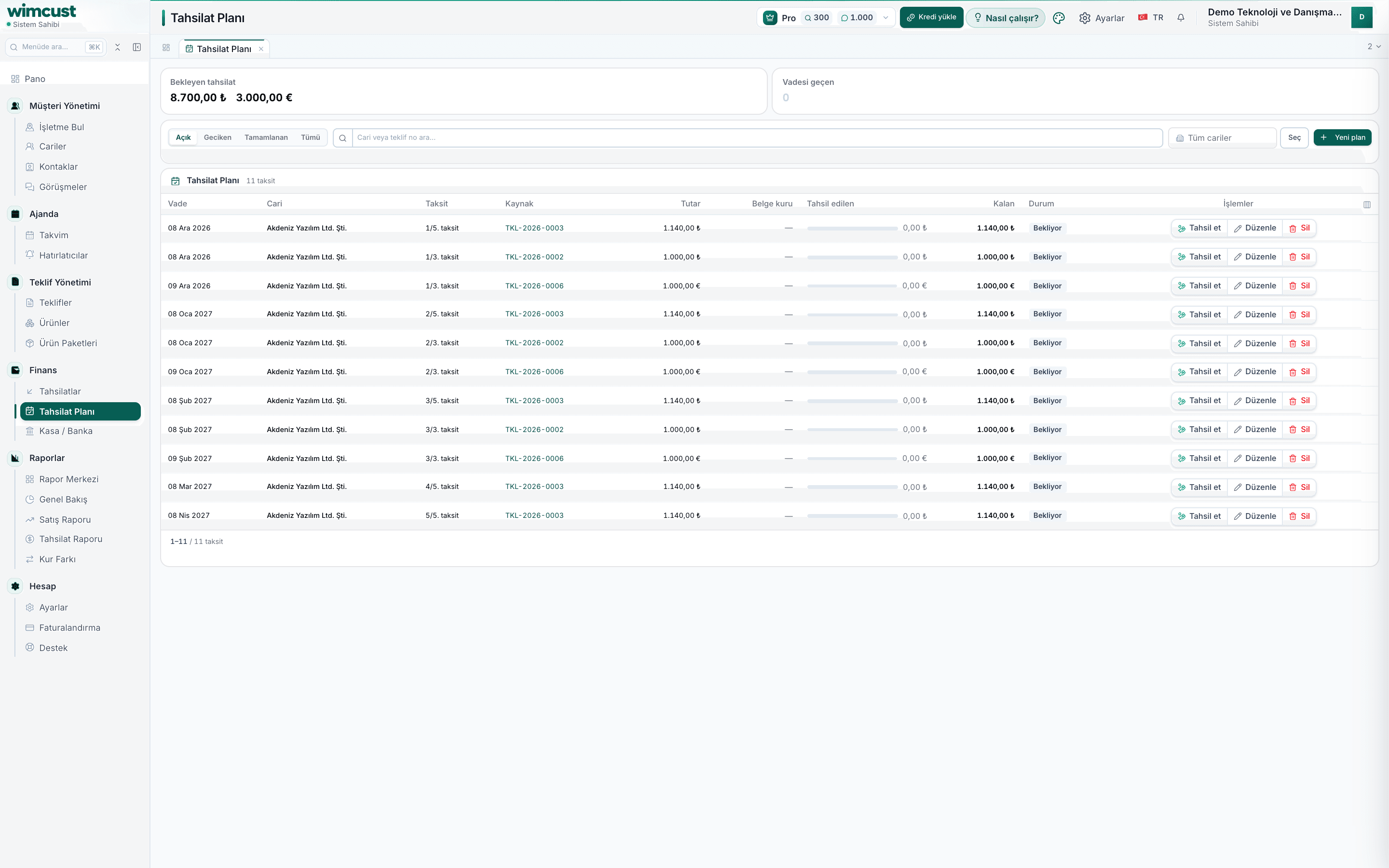
While preparing a quote you choose the payment method and the number of installments. The surcharge rate applied to deferred installments comes from a rate table you define per payment method; on mixed-rate documents the tax on the surcharge is calculated with a weighted rate. If the line items change, the difference is written to the last installment. The plan is validated on the server; if the total does not match, it is not saved.
Installment status
The paid amount and status of each installment are calculated from the payments entered, never typed by hand. If a payment is deleted, the installment status goes back too. On the Collection Plan screen you see upcoming and overdue installments; the Collections report ages the remaining balance of open installments into not yet due, 1-30, 31-60, 61-90 and over 90 days.
Cash and bank
A payment goes into a cash or bank account and is posted to the account ledger at the same time. The cash balance is not stored; it is summed from the movements, so the balance and the movements never contradict each other. Transfers between accounts and manual movements can be entered. An account with movements cannot be deleted, it is set to inactive.
Foreign-currency debt, paid in another currency
When an installment of a quote issued in USD is paid in your local currency, the transaction carries two amounts: the amount that entered the cash account and the USD amount deducted from the debt. The rate is suggested from the Exchange Rates table; you can change it. The difference between the document rate and the rate on the payment day is recorded as an FX difference and listed in the FX Difference report.
Reminders and automation
With manager automation, a list of upcoming or overdue installments can be sent to your team by email or WhatsApp; with customer automation, a payment reminder goes to the customer. Every channel is off by default; you turn it on.
When entering a payment
In the payment window you choose the account, the related installment, the cash account and the amount. If the debt and the cash account are in the same currency, a single amount is enough. If they differ, two amounts are entered; when one is typed, the other is calculated from the rate. You can choose between "today's rate" and "document rate"; an installment closed at the document rate produces no FX difference. If a payment was entered wrongly, you delete it; the cash and account lines tied to it are deleted together and the installment is recalculated.
What do you see on the cash account detail?
On a cash or bank account detail the source of each movement is visible: which quote the payment came from, which foreign-currency debt it closed and the FX difference, if any. The report also includes the total FX difference for the last 12 months.
Looking at it through reports
The Collections report works as of today: monthly collected amounts are summed in the currency of the debt, different currencies are never added together, and the currency is chosen in the top bar. The accounts with the highest balances are listed from the account statement balance. Detailed breakdowns can be exported to Excel from the Report Center.
Who sees it?
Money is company business: finance screens and collection reports are open to users with the finance permission. The default sales rep role has no finance; a rep prepares quotes but does not see cash balances. You can open this permission to anyone you like in the role editor.
Details: payment collection tracking, automation, reports.
Features used in this solution
Payment Collection Tracking: Instalment Plans, Cash, Bank and Account Statements
From quote approval to collection: instalment plans, late-payment interest, cash and bank accounts, account statements, foreign-currency payments and exchange difference tracking.
See detailsQuote Management: The Right Quote From Your Catalog in Minutes
Build quotes from your product catalog: foreign-currency lines, discounts, VAT, withholdings and revision tracking in one form.
See detailsAutomation: The Right Message to the Right Person When an Event Happens
With admin and customer automation, send email and WhatsApp notifications on quote and payment events using ready-made system texts.
See detailsReports and Report Center: Measure Sales, Collections and Your Team
Sales funnel, conversion, rep scorecard, collection ageing and exchange difference reports; detailed breakdowns and Excel from the Report Center.
See detailsMulti-Language and Multi-Currency: 13 Languages, Automatic Rates, Per-Line Currency
WimCust works in 13 languages; your main currency follows your country, rates come automatically from the TCMB or ECB, and quote lines can be in foreign currency.
See detailsFrequently asked questions
Do sales reps see payment information?
The finance permission is granted through the role; the default sales rep role has no finance.
What happens to the debt if a quote approval is reversed?
It is closed with a reversing entry and the plans are cancelled; if a payment has been entered on the plan, the reversal is blocked.
Can I enter a payment from mobile?
The mobile app has payments, collection plan and cash/bank screens; the screens depend on the role's mobile permissions.
Other solutions
Switching from Excel to a CRM
Move your Excel customer list into WimCust with a preview import; go beyond Excel's limits with conversation history, reminders, quotes and team permissions.
See detailsCRM Software for Small and Mid-Sized Sales Teams
WimCust CRM software: lead generation, account tracking, conversations and calendar, quotes and e-Quote, payment collection, WhatsApp, automation, reports and a mobile app on one platform.
See detailsWhatsApp CRM for Customer Follow-Up
Send quote links, introduction messages and automatic reminders from your company's own WhatsApp number in WimCust; every message stays logged in notification history.
See detailsSign up and find your first 60 prospects for free
Start today and find your first customer this week
The Starter plan is free forever. Open your account without a credit card and create your first customer card in minutes.