

Sales
Quote Management: The Right Quote From Your Catalog in Minutes
Line items, currency, discounts, tax withholdings and payment plan in one form; the system calculates the amounts.
Build quotes from your product catalog: foreign-currency lines, discounts, VAT, withholdings and revision tracking in one form.
Features
What can you do with Quote Management?
Catalog and bundles
Product details are copied to the line; a free-form line is linked to the catalog when saved.
Per-line currency
Each line in its own currency; automatic or manual document rate.
Correct discount maths
The document discount is distributed in proportion to the lines, before VAT.
Withholding taxes
Withholding is taken from the VAT and income tax withholding from the taxable amount; both come off the total.
Payment plan and interest
A schedule tied to the payment method, with maturity interest at a weighted VAT rate.
Revision and approval trail
The previous state is kept, the quote number stays, and the signature moves to the revision.
How it works
Step by step
- 1
Choose the account and lines
Add a product or bundle from the catalog, and type a free-form line if needed.
- 2
Price it
Enter currency, discount, VAT and withholdings; totals are calculated instantly.
- 3
Add the plan
Choose the payment method and set up the payment plan.
- 4
Send it
Deliver it to the customer by e-quote link, WhatsApp or email.
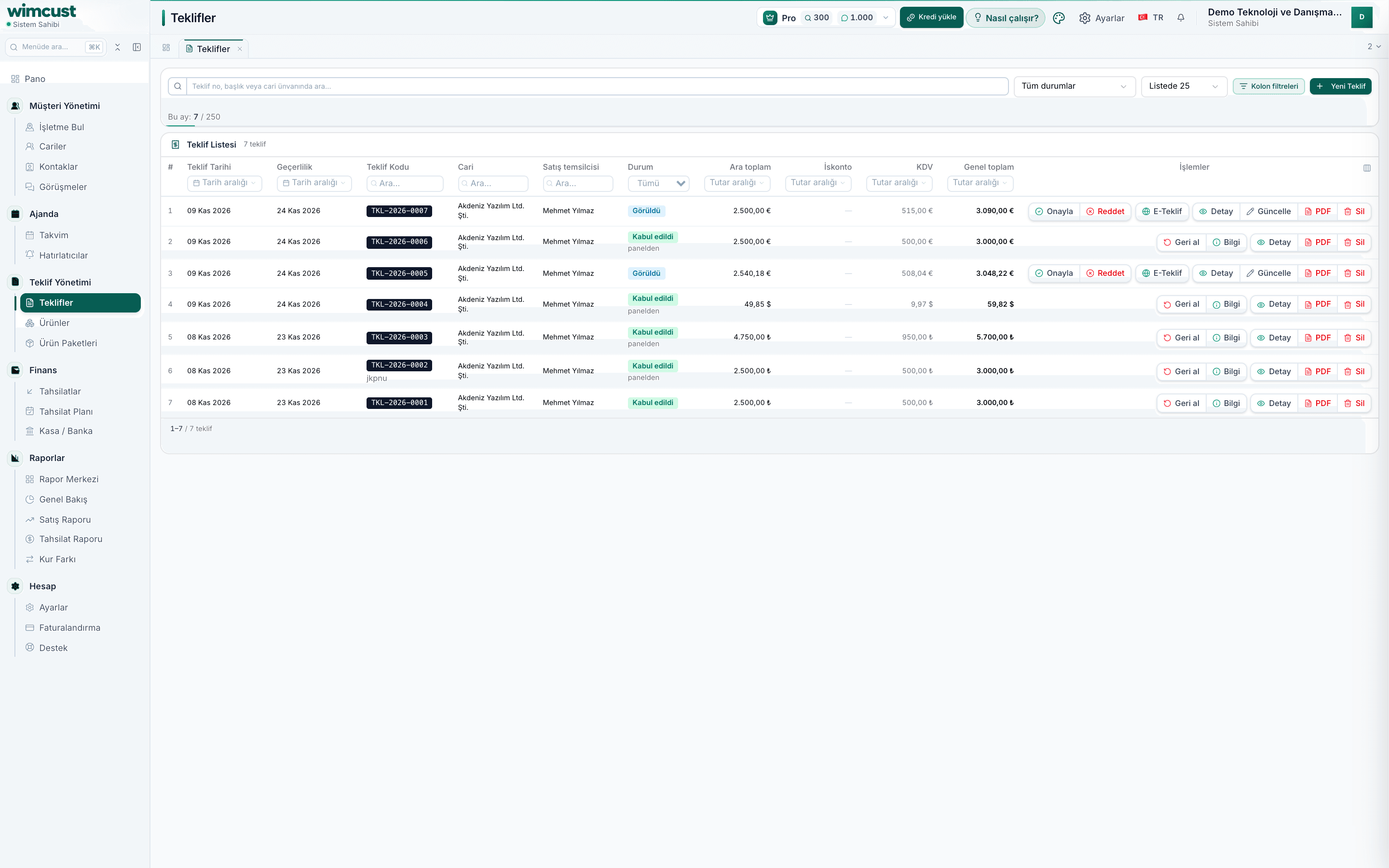
Preparing a quote in a spreadsheet looks easy, until a foreign-currency line, mixed VAT rates, a document-level discount or a tax withholding comes into play. WimCust's quote management module does these calculations for you and stores each quote as a numbered, traceable document linked to the customer. Everything you expect from quoting software, inside your CRM.
Line items: from the catalog or free-form
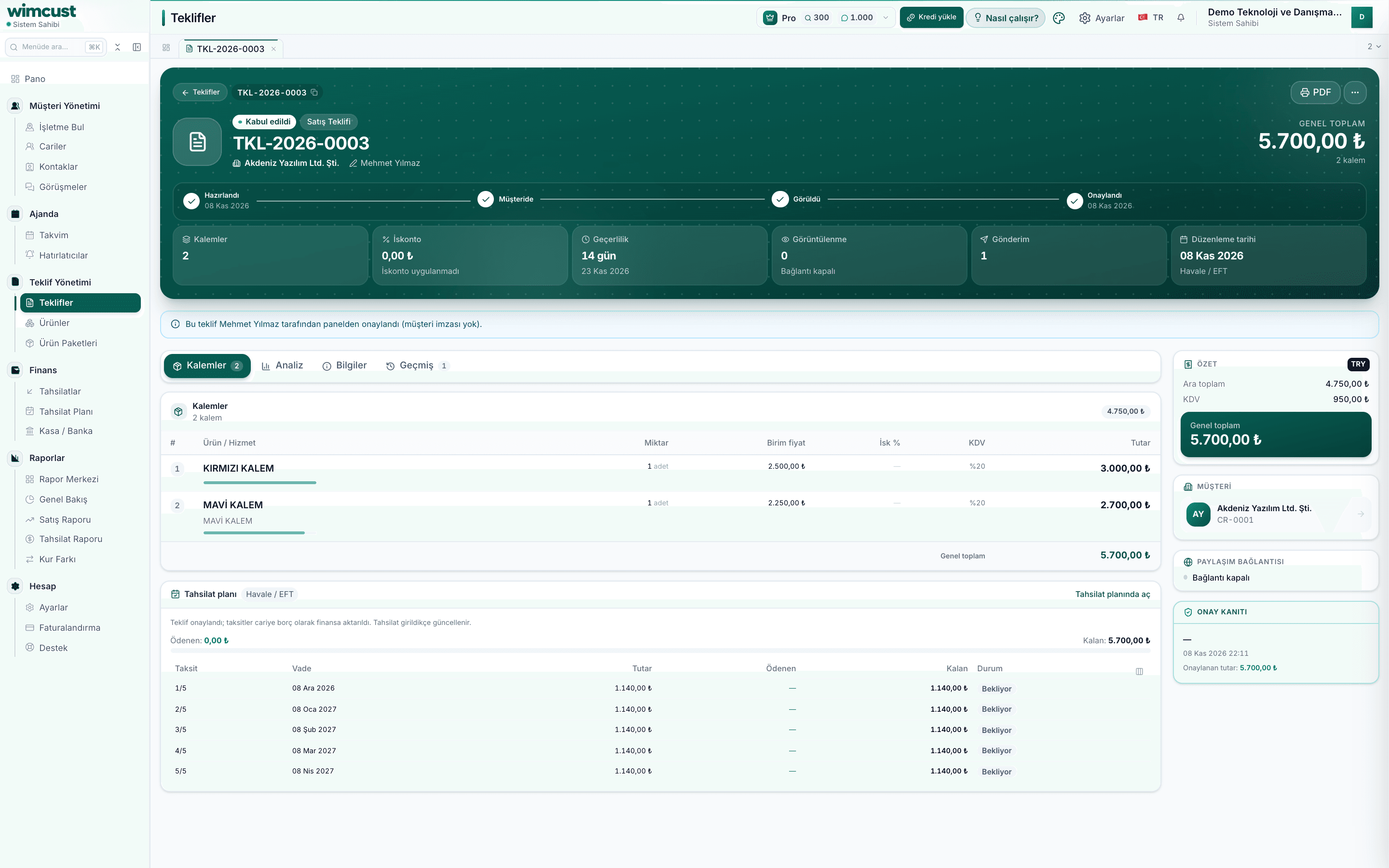
You can pick a quote line from your product catalog or type it freely. A line that comes from the catalog copies the product's name, unit and tax rate; even if the catalog changes later, past quotes stay exactly as they were. A line typed freely is linked to the catalog when the quote is saved: if a product with the same name exists, it is matched to it; otherwise it is created as a new product when an authorized user saves the quote. With ready-made product bundles you can add frequently sold groups of items in one go.
Currency and exchange rates
Every quote line can carry its own currency: while the document is in your local currency, one line can be in dollars and another in euros. The line's price is entered in its own currency and converted to the document currency at the exchange rate. The document rate is chosen automatically (central bank or ECB rates, depending on your country) or manually; when the rate changes, all lines are recalculated. The currency of a catalog product is locked in the quote, so a price is never given in the wrong currency. See the multi-language and multi-currency page for details.
Discounts
- A line discount is entered as a percentage or an amount; when an amount is entered, it takes precedence over the percentage.
- A document discount is distributed in proportion to the lines' taxable amounts and applied before VAT. If the lines have different VAT rates, which rate the discount comes off changes the tax; that is why it is not simply subtracted from the total in one step.
- Tiered discounts are kept for display; the effective rate enters the calculation.
Tax withholdings
For Turkey, where withholdings are an integral part of B2B sales, the withholding taxes (tevkifat/stopaj) are calculated on the correct base:
- VAT withholding (tevkifat) is deducted from the VAT; the 5/10 notation means 50% of the VAT.
- Income tax withholding (stopaj) is deducted from the taxable amount and has nothing to do with VAT.
- Neither is added to the document; they are deducted, so the quote shows the amount the buyer will pay.
If you do not work with these withholdings, they simply stay empty and the quote is calculated with VAT and discounts only.
Payment plan and late-payment interest
An instalment payment plan can be added to the quote. The payment method is chosen first; the maturity-interest rate comes from a schedule defined per payment method, according to the number of deferred instalments. The VAT on that interest is calculated at the weighted rate of the document. The total of the plan lines has to match the document total; if line items change, the difference is written to the last line.
Calculation safety
Amounts are always calculated on the server: totals coming from the browser are not read, and only quantity, price, discount and tax rate are taken. Rounding is to two decimals per line, and the document total is the sum of the rounded lines. The live preview you see in the form is an exact copy of the same calculation; the amount you see on screen is the amount that is saved.
Statuses, approval and revision
A quote starts as a draft, becomes "sent" when it goes to the customer, the customer approves or rejects it, and if the validity date passes it expires. An approved, rejected or expired quote cannot be edited; the content of a signed document must not change afterwards.
If the customer said "OK" on the phone, the decision can also be recorded from the panel; a panel decision records who made it, the IP and the device. When a change is needed, a revision is taken: a snapshot of the previous state is kept, the approval trail moves to the revision and the quote number does not change. An authorized user can undo an approval; the quote returns to draft and the trail is not erased.
From approval to finance
An approved quote is written to the account statement as a debit and its payment plan is transferred to finance. What comes after that is the job of collection tracking.
Other details
- The quote number is specific to your company and is issued in sequence.
- The description is visible to the customer, while the internal note never appears on any customer screen or in the PDF.
- Quote terms come from ready-made templates; even if a template changes later, a quote that has been sent stays the same.
- Depending on your plan, there may be a monthly quote limit.
You can send a finished quote with an e-quote link, change its design and download it as a PDF.
Frequently asked about Quote Management
Why is VAT withholding calculated on the VAT?
Under Turkish rules, VAT withholding means a share of the VAT is paid by the buyer; a 5/10 rate means half of the VAT. If it were calculated on the taxable amount, the deduction would come out many times larger.
Can I use different currencies in the same quote?
Yes. Each line is priced in its own currency and converted to the document currency at the line rate.
Can I change an approved quote?
It cannot be edited directly. If an authorized user undoes the approval, the quote returns to draft and the approval trail is kept as a revision; it can then be edited and sent again.
Can I put a product that is not in the catalog on a quote?
Yes, as a free-form line. When the quote is saved, it is linked to a product with the same name if one exists; otherwise an authorized user's quote adds it to the catalog as a new product.
How are quote numbers issued?
The quote number is specific to your company and generated in sequence; it does not change when a revision is taken.
Features used together
Product Catalog: Products, Categories and Bundles
Define products and services with price, unit, VAT and currency; speed up quotes with an unlimited category tree and product bundles.
See detailsQuote Design, PDF and Printing
Pick a ready-made document template or save your own quote design; the quote prints and converts to PDF with the same look.
See detailsOnline Quotes: A Quote Link and the Customer's Signed Approval
Send your quote by WhatsApp or email as a PIN-protected online link; the customer approves or rejects it on a single screen.
See detailsSign up and find your first 60 prospects for free
Try Quote Management today
The Starter plan is free forever. Open your account without a credit card and create your first customer card in minutes.