

Customers
Customer Account Tracking: Account Card, Contacts and Portfolio in One Place
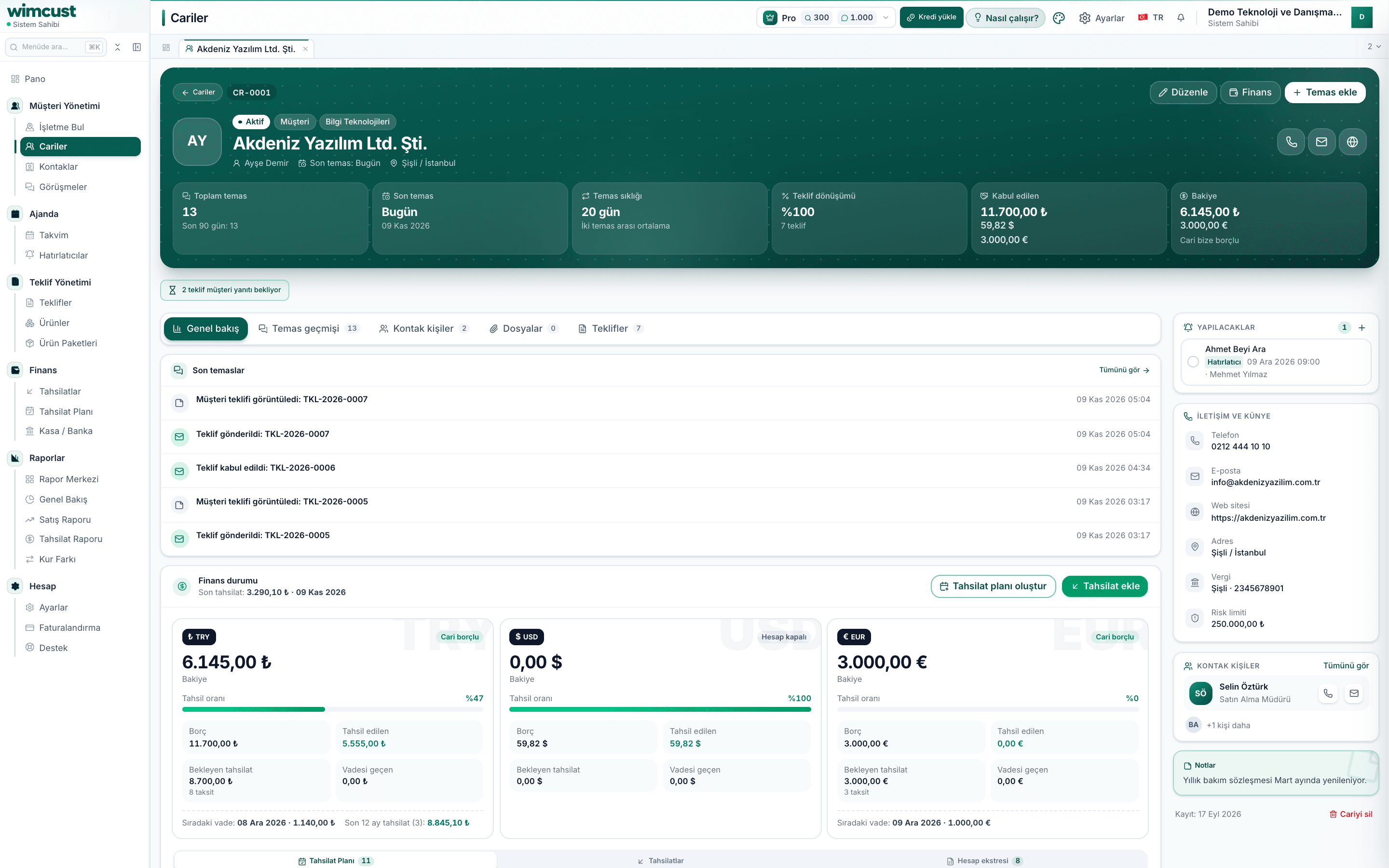
Each customer's identity, contacts, interaction history, quotes and balance on the same card.
Manage customer and supplier accounts, contacts, documents and rep portfolios on one screen with WimCust account tracking.
Features
What can you do with Customer Account Tracking?
Customer history on one card
Contacts, interactions, quotes, finance movements and documents sit in tabs on the account detail.
Multiple contacts
Unlimited contacts per account; one is primary. A contact without a channel is not saved.
Automatic last contact
Last contact updates itself as conversations are logged, so cooling customers stand out.
Two-step Excel import
Preview first, then write in one go; duplicates are caught by code, tax ID and company name.
Tax ID validation
A check-digit algorithm catches a wrong number before it enters the record.
Portfolio and bulk assignment
Reps see only their own accounts; a portfolio can be handed over in one go.
How it works
Step by step
- 1
Bring in your accounts
Import your existing list from Excel using the template, or add accounts one by one.
- 2
Assign contacts and reps
Add contacts to each account and choose the responsible rep.
- 3
Log interactions
Record every call, visit and meeting on the card; last contact updates automatically.
- 4
Watch the list
Use status, rep and last-contact filters to see which customer you need to get back to.
Account tracking is the core record a company relies on for sales and collections: who you work with, who you reach at that company, what you last talked about, what you quoted and how much you are owed. WimCust gathers all of these answers in a single account card. Information scattered across spreadsheets, phone contacts and email folders lands on one customer tracking screen.
What is on the account card?
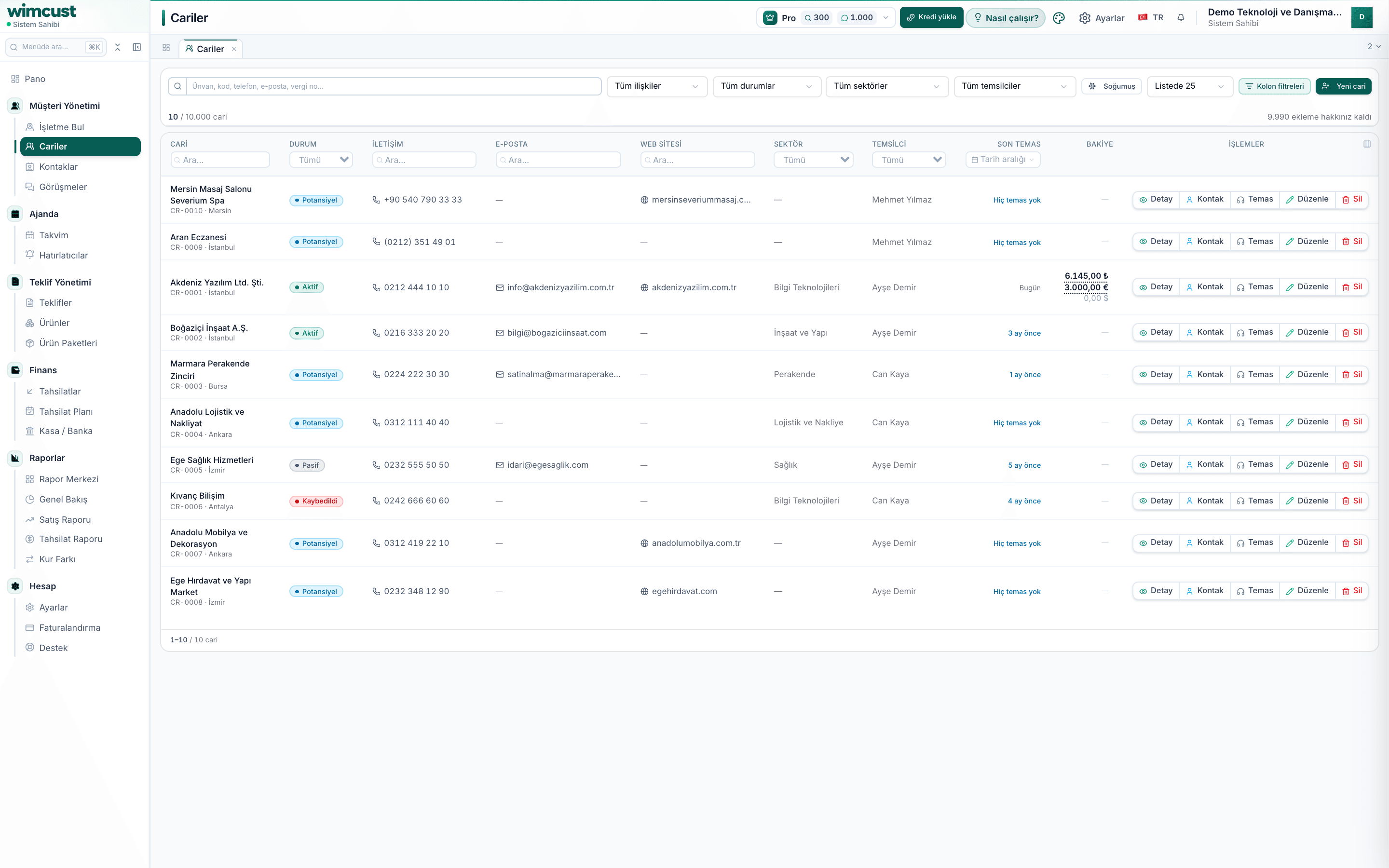
Every account carries a code, company name, type, status, industry, responsible rep, tax details and a risk limit. The relationship type tells you what the account is to you: customer, supplier or subcontractor. An account can have several phone numbers, email addresses and websites; in the list they appear neatly in a single cell.
In the account detail the whole card is split into tabs: summary, contacts, interactions, quotes, finance movements and documents. When you open a customer, you do not need to go to another screen to understand their history.
Contact people
With corporate customers, the person you talk to is often not the company itself but a purchasing officer, an accountant or a general manager. WimCust lets you add as many contacts as you like to each account, and one of them is marked as the primary contact. Every contact requires at least one channel (phone, mobile or email), because a person without a channel cannot receive a quote or a reminder. When sending a quote, you can select the account itself and its active contacts as recipients.
Status and last contact
The account status (prospect, active, inactive, lost and so on) is separated by colour. In addition, the last contact date is calculated automatically on every card: when a conversation record is entered, the system updates it by itself. Internal notes and future-dated plans that have not happened yet do not count as contact. This way, customers who have not been called for a long time and are starting to go cold surface on the dashboard on their own.
Search, filters and list
Search in the account list runs across company name, account code, phone, email, tax number and secondary contact details together. With column filters you can narrow the list, change the sort order and choose which columns you want to see. You can also export the list, with the filter applied, as a real Excel file (if the Excel module is enabled in your plan).
Import from Excel
You do not have to type your existing customer list by hand. Import works in two steps: first your file is previewed, and without writing anything it shows which rows are new, which duplicate an existing record and which contain errors. Once you confirm, the whole file is written in one go. Duplicates are detected by code, tax number and company name; different number formats such as 250.000,00 and 1,234.56 are read correctly. A ready-made template file can also be downloaded.
Tax number validation
Tax ID numbers (such as the Turkish VKN and TCKN) are validated instantly with a check-digit algorithm, so a mistyped number is caught before it enters the record. This validation needs no setup. Fetching a company name from a tax number is a separate service, and to use it you define the details of a provider you subscribe to.
Rep portfolio
Every account can be assigned to a rep. Depending on your role, you see either all of the company's accounts or only your own portfolio; even if a user without permission tries to open another rep's account by its address, the record is not visible to them. When a rep leaves or changes territory, the portfolio is handed over to another rep in one go with bulk assignment. A rep who has a portfolio cannot be deleted; their accounts are first reassigned or the user is deactivated, so no customer's history is left without an owner.
Documents
Files such as contracts, quote PDFs and business card images are uploaded to the account's documents. Storage is limited by your plan's quota; when an account is deleted, its files are cleaned up too.
The account card and other modules
The account card is the centre of everything in WimCust. A prospect you find with Business Finder becomes an account with one click. Conversation records build the card's interaction history. Quotes are linked to the account, and an approved quote is written as a debit to the account statement. Teams in the field open the same card from the mobile app, call, write on WhatsApp or get directions.
Frequently asked about Customer Account Tracking
What is the difference between an account and a contact?
An account is the company or person you work with (customer, supplier, subcontractor). A contact is an employee at that account, such as a purchasing officer or an accountant. An account can have several contacts.
Can I import my existing Excel customer list?
Yes. Your file is previewed first; new, duplicate and faulty rows are shown before anything is written. When you confirm, everything is imported in one go.
Can reps see each other's customers?
A rep whose role has not been given permission to see all accounts sees only the accounts in their own portfolio. Even if they open another account's address, the result is a not-found response.
Can I save an account without contact details?
Yes, an account can be saved without contact details; the form only warns you. Contacts, however, require at least one phone number or email.
Does the company name come automatically from a tax number?
Number validation always works. Fetching the company name requires the details of a provider service to be configured; in Turkey there is no official keyless endpoint for this.
Features used together
Calendar and Reminders: Never Forget a Customer Follow-Up
Plan customer follow-ups in the calendar, complete or postpone them. Reminders arrive as panel notifications, email and WhatsApp.
See detailsInteraction Tracking: Every Call, Visit and Meeting on Record
Log calls, meetings, emails and visits on the account; contact history, last contact date and cold-customer alerts build up automatically.
See detailsBusiness Finder: Find Prospects on Google Maps
Scan Google Maps businesses by industry and location, filter them, see them on the map and move them to accounts with one click.
See detailsSign up and find your first 60 prospects for free
Try Customer Account Tracking today
The Starter plan is free forever. Open your account without a credit card and create your first customer card in minutes.